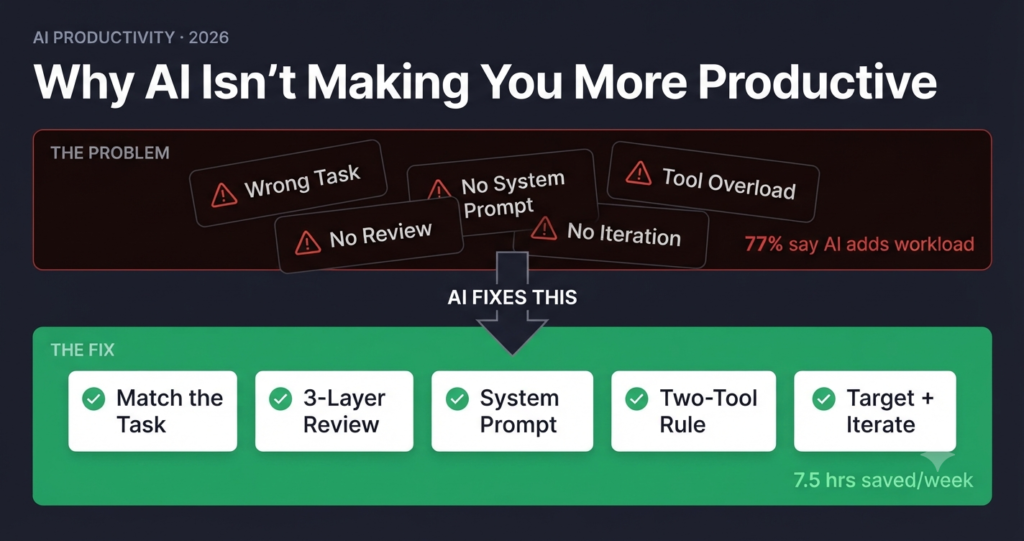
In 2025, the Upwork Research Institute surveyed thousands of freelance and knowledge workers about their experience with AI tools. They expected to find widespread reports of time saved. Instead, they found that 77% of workers using generative AI said it added to their workload rather than reducing it — primarily due to the overhead of reviewing, correcting, and validating AI outputs. The researchers called it the “productivity paradox of AI”: the more capable the tools got, the more time some workers spent managing them.
Source: Upwork Research Institute, 2025 · Microsoft Work Trend Index, 2026The problem isn’t that AI doesn’t work. The problem is that most people are using it wrong — in ways that create overhead instead of eliminating it.

“Three out of four knowledge workers are using AI at work. Only 32% of companies say they’ve achieved sustained, real productivity gains from it.” — Microsoft Work Trend Index, 2026
📋 5 Problems Covered — With Exact Fixes
- ⚠️ Problem 1: Using AI for the wrong tasks — and the capability frontier fix
- ⚠️ Problem 2: Treating AI output as finished work — and the verification workflow
- ⚠️ Problem 3: No system prompt — and the persistent context fix
- ⚠️ Problem 4: Tool overload — and the two-tool stack rule
- ⚠️ Problem 5: No feedback loop — and the iteration habit that compounds
Here’s what’s actually happening in most workplaces in 2026: people adopted AI tools quickly, without changing their workflows to match how the tools actually work. They’re asking AI to do things it does poorly, accepting outputs that need substantial revision, and switching between four different tools when two would do the job better. The result is more complexity, not less.
The good news is that each of these problems has a specific, practical fix. According to Harvard Business School research on AI and knowledge worker productivity, subjects using AI correctly outperformed those not using AI, completing tasks 25.1% more quickly while delivering solutions of significantly improved quality. The gap between “AI added to my workload” and “AI saves me hours every week” isn’t about which tools you use. It’s about whether you’ve matched the tool to the task — and built the right habits around it.
⚠️ The Problem
The most common productivity mistake is treating AI as a general-purpose solution for every task. When AI is applied to work that requires real-world access, recent proprietary data, deep domain expertise, or complex managerial judgment, it either fails outright or produces confident-sounding nonsense that takes longer to fix than it would have to write from scratch. The Harvard Business School research found that when AI was applied to complex managerial tasks outside its capability frontier, users were 19% less likely to produce correct solutions than those working without AI. Using AI on the wrong task doesn’t just waste time — it produces worse outcomes than no AI at all.
✅ The Fix — Match the Task to the Frontier
Before asking AI to do something, apply a simple two-question test: Does this task require information AI can’t have (proprietary data, real-time events, direct experience)? Does this task require judgment that depends on context AI doesn’t have (org politics, client history, nuanced stakeholder dynamics)? If yes to either question, AI is a support tool at best — not the primary worker. Use it to draft structure and research background, then apply your own judgment to the substance. Reserve full AI delegation for tasks where the model’s training data is sufficient and the output is verifiable without domain expertise.
⚠️ Problem 2: Treating AI Output as Finished Work
⚠️ The Problem
This is the error that creates the most visible damage — and it’s surprisingly common. AI output sounds authoritative even when it’s wrong. Hallucinated statistics, outdated pricing, fabricated quotes, and plausible-but-incorrect technical explanations all appear in the same confident, fluent prose as accurate content. When AI output goes directly to a client, gets published on a website, or gets submitted as a report, the professional consequences can be significant. The problem isn’t that AI makes mistakes — every tool does. The problem is that AI mistakes are harder to spot than human mistakes because the writing around them is polished.
✅ The Fix — The Three-Layer Review Protocol
Treat AI output the way a good editor treats a junior writer’s first draft: assume it’s a useful starting point, not a finished product. Apply three verification layers before anything leaves your hands. First, fact-check every specific claim — any statistic, pricing figure, product feature, or expert quote needs to be traced to a primary source. Second, read for voice — does this sound like you, or does it sound generic? AI defaults to a competent-but-neutral register that often needs personalization. Third, check for gaps — what did the AI not include that your audience actually needs? The gap between “decent AI draft” and “published work you stand behind” is almost always smaller than you expect — typically 20–30 minutes of focused editing.
⚠️ The Specific Risk With Statistics
AI models are particularly prone to hallucinating statistics — generating plausible-sounding numbers that either don’t exist or are misattributed. Never publish a statistic from AI output without verifying it against the original source. If you can’t find the original source, don’t use the stat. A fabricated statistic that gets picked up by other publications creates a compounding credibility problem that’s very difficult to correct.
⚠️ Problem 3: Starting Every Session From Zero
⚠️ The Problem
Without a system prompt or persistent memory configuration, every AI conversation starts from scratch. The model doesn’t know who you are, what you do, who your audience is, what your writing style looks like, or what constraints apply to your work. So you spend the first 5–10 minutes of every session re-establishing context that should have been loaded automatically. Multiply that across 20 AI sessions a week and you’re spending 2–3 hours a week just getting the AI up to speed — time that compounds into days per month. According to Microsoft’s 2026 Work Trend Index, only 27% of employees strongly agree they are comfortable delegating tasks to AI agents — and context setup friction is a primary driver of that discomfort.
✅ The Fix — Build Your Master System Prompt
Invest 30 minutes once to write a system prompt that encodes everything the AI needs to know about you and your work. Save it in Claude Projects (if you use Claude) or as a Custom GPT system prompt (if you use ChatGPT). Every conversation then starts with full context already loaded. Your system prompt should include: your role and professional background, your primary audience and what they care about, your preferred tone and writing style (with 1–2 examples), your most common task types, and any standing constraints (word count preferences, topics to avoid, formatting rules). Version it. Update it quarterly. Treat it like production code because functionally, it is.
💡 Quick-Start System Prompt Template
Copy this and fill in your details: “You are assisting [YOUR NAME], a [YOUR ROLE] who creates content for [YOUR AUDIENCE]. My writing tone is [ADJECTIVE, e.g. conversational and direct]. I prefer [FORMAT PREFERENCE]. Always verify factual claims rather than speculating. My most common tasks are [LIST 2–3]. When in doubt, ask one clarifying question before proceeding.”
⚠️ Problem 4: Tool Overload Creating More Friction Than It Removes
⚠️ The Problem
The average knowledge worker in 2026 has access to 4–6 AI tools, actively uses 2–3 of them regularly, and gets real productivity value from maybe one. The rest are either underused subscriptions generating monthly charges, or context-switching overhead — the cognitive cost of remembering which tool does what, logging into different platforms, and learning different interfaces. Tool sprawl is real and it’s expensive in both money and mental bandwidth. The Upwork Research Institute found that 77% of freelance workers using generative AI reported that it added to their workload rather than reducing it, primarily due to review and validation overhead — and tool-switching between multiple platforms amplifies that overhead significantly.
✅ The Fix — The Two-Tool Rule
For most individual knowledge workers, a two-tool stack covers 90% of productivity use cases: one primary AI assistant for writing, reasoning, and research (Claude or ChatGPT — pick one and go deep), and one specialized tool for the specific task type that matters most to your workflow (video repurposing, image generation, scheduling, code execution). Everything else is overhead until you’ve hit the productivity ceiling of your two primary tools. Cancel the other subscriptions, remove the apps from your taskbar, and spend the freed-up cognitive bandwidth mastering what you kept. Depth beats breadth, every time.
⚠️ Problem 5: No Iteration Loop — Using AI Like a Vending Machine
⚠️ The Problem
Most people use AI like a vending machine: put in a request, accept whatever comes out, move on. If the output is 70% right, they either spend time fixing it or publish something suboptimal. If it’s clearly wrong, they retype a slightly different prompt from scratch and hope for better luck. Neither approach takes advantage of what AI is actually good at: rapid iteration. The first output is a hypothesis, not a deliverable. Treating it as final means you’re capturing maybe 40–50% of the value the tool is capable of delivering on that task.
✅ The Fix — The Targeted Correction Habit
When the first AI output isn’t right, don’t regenerate from scratch. Instead, tell the model exactly what to fix: “The opening paragraph is too generic — rewrite it to lead with the specific problem, not a broad statement about the industry.” “The tone is too formal — make it more conversational, shorter sentences, use contractions.” “The third section is missing the cost breakdown — add it using the pricing data I gave you earlier.” One targeted correction takes 10 seconds and typically gets you 80% of the way to a final draft. Three targeted corrections on a complex piece will outperform five regenerations every time.

📊 The Productivity Gap: Before and After Fixing These Problems
| Workflow Element | Before Fix | After Fix | Time Impact |
|---|---|---|---|
| Task selection | AI on everything, including wrong-fit tasks | AI only on in-frontier tasks | −2 hrs/week revision |
| Output review | Publish first draft or heavy rewrite | Structured 3-layer edit | −1.5 hrs/week errors |
| Session setup | Re-establish context every session | System prompt loads context automatically | −2 hrs/week setup |
| Tool management | 4–6 tools, constant context-switching | 2 tools, deep familiarity | −1 hr/week switching |
| Iteration habit | Accept first output or regenerate from scratch | Targeted correction on specific gaps | −1 hr/week per task |
Total potential time recovered: 7.5+ hours per week — not from adopting new AI tools, but from fixing how you use the ones you already have. The NBER and Microsoft research found that knowledge workers using generative AI tools correctly saved 3.6 hours per week on email management alone — a 31% reduction in email time. The ceiling on AI-driven productivity gains is substantially higher than most people are currently capturing.
✅ The Weekly AI Productivity Audit
These five problems don’t fix themselves. They require a brief weekly check-in to catch drift before it compounds. This takes about 10 minutes on a Friday afternoon and pays back every minute the following week.
- Which AI tasks this week produced outputs I used with minimal editing? (These are your best-fit AI tasks — do more of them.)
- Which AI tasks produced outputs I substantially rewrote or discarded? (These are candidates for task re-evaluation — is AI actually helping here?)
- Did I start any sessions by re-establishing context I should have in a system prompt? (If yes, update the system prompt today.)
- Did I publish or submit anything from AI without adequate verification? (If yes, audit what went out and build the review step into next week’s workflow.)
- Am I actively using more than two AI tools? (If yes, which ones could I cut without meaningful loss?)
- On tasks where AI output was 70% right, did I use targeted correction or regenerate from scratch? (If the latter, practice targeted correction next week.)
❓ Frequently Asked Questions
Why does AI feel like it’s making me busier rather than saving time?
This is the most common experience for new-to-intermediate AI users, and it’s well-documented in research. The primary cause is the review and validation overhead that comes with AI outputs — you spend more time checking the work than you saved generating it. The fix is a combination of better task selection (using AI only where it genuinely fits), better prompting (getting first drafts that need less revision), and a streamlined review process. Most users who make these three changes report a significant shift from “AI adds work” to “AI saves time” within 4–6 weeks.
How do I know which tasks are inside versus outside AI’s capability frontier?
The practical test: Can a highly intelligent person with general knowledge but no specific access to your situation, your data, or your context do this task well? If yes, AI can probably do it well too. If the task requires proprietary information, real-time data, direct relationships, physical access, or judgment based on context the model doesn’t have — that’s outside the frontier. Tasks that reliably fall inside the frontier include drafting, summarizing, explaining, reformatting, brainstorming, translating, and structuring. Tasks that reliably fall outside include investigative research, strategic decisions with high organizational stakes, and anything requiring verified current information AI hasn’t been trained on.
How long does a good system prompt take to write?
About 30 minutes to write a solid first version, and 10 minutes every quarter to update it. The time investment pays back within the first week for anyone using AI more than 5 hours per week. Start with your role and audience (2–3 sentences), your most common task types (a short list), your tone and style preferences (2–3 adjectives plus one example sentence), and your key constraints (format preferences, topics to avoid, verification requirements). Most people find that the act of writing the system prompt also clarifies their AI workflow significantly — it forces you to think about what you actually need from the tool.
Is it worth subscribing to multiple AI tools at once?
For most individual knowledge workers, no — at least not until you’ve hit the productivity ceiling of one primary tool. The exception is if two tools genuinely serve different, non-overlapping use cases: for example, Claude for long-form writing and analysis plus a dedicated video repurposing tool. Where the math doesn’t work is paying for three general-purpose AI writing tools simultaneously — the marginal value of the second and third subscriptions is almost always lower than the cognitive cost of managing them. Start with one, master it, and only add a second tool when you identify a specific capability gap it can’t fill.
How much AI output requires human editing before it’s publication-ready?
For well-prompted, in-frontier tasks: typically 20–40% revision to reach publication quality — catching factual errors, sharpening the opening, adding specific examples, and calibrating tone. For poorly prompted or out-of-frontier tasks: potentially 70%+ revision, at which point writing from scratch is often faster. The quality of your prompt determines the revision overhead more than any other factor. A detailed, role-anchored, format-specified prompt consistently produces drafts that need less work than a vague open-ended request — often by a factor of two or three.
🏁 The Real Productivity Unlock
The gap between “AI made me busier” and “AI saves me 5+ hours a week” isn’t about which tools you use. It’s about five specific workflow decisions — and fixing them doesn’t require new subscriptions, advanced technical skills, or hours of setup. It requires about 30 minutes of deliberate workflow redesign and a new habit of treating AI as a collaborator that needs good direction, not a vending machine that delivers finished products.
Microsoft’s research confirms that 93% of AI power users say AI boosts their productivity, and 92% say AI helps them focus on the most important jobs. The difference between those users and the 77% who say AI added to their workload isn’t access to better tools. It’s having solved the five problems in this article.
Pick the one problem from this list that resonates most strongly with your current experience. Fix that one this week. Don’t try to implement all five at once — that’s the sixth productivity mistake. One change, tested for a week, with a before-and-after time measurement. Then the next one. That compounding approach is what the most productive AI users actually do.
Which of these five problems is costing you the most time right now? Drop it in the comments — I read every one.