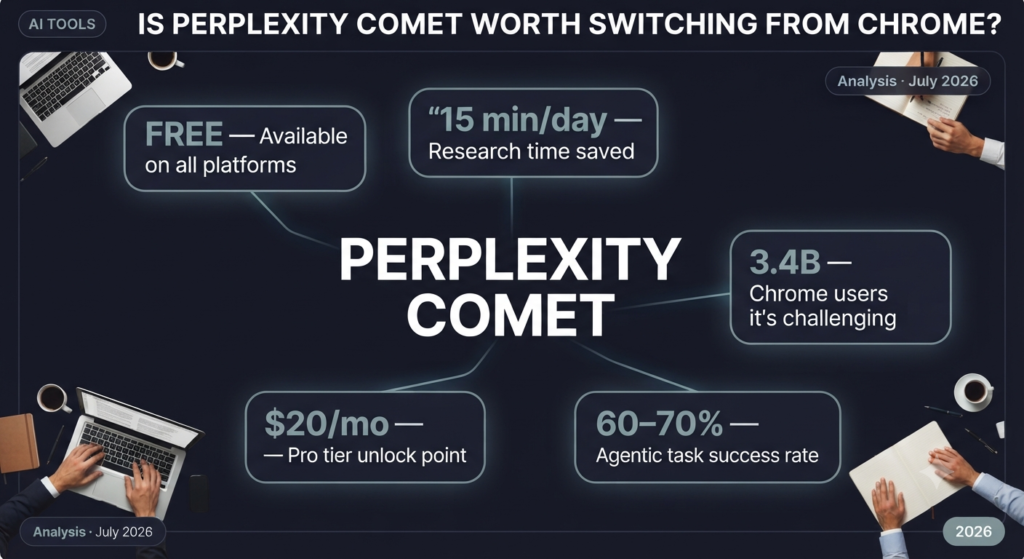

Perplexity Comet vs Chrome: AI browser deep-dive analysis — July 2026
AI Browser Analysis
Perplexity’s Comet landed on every platform for free in 2026 — but does ditching Chrome actually make you more productive, or is it just a shiny new thing?
“The era of the passive browser is over. The question isn’t whether AI belongs in your browser — it’s which AI, and whether you trust it.”
📋 What You’ll Learn in This Analysis
- 🔍 What Perplexity Comet actually does differently from Chrome (it’s not just a chatbot sidebar)
- 📊 A feature-by-feature breakdown: AI depth, privacy, extension support, and performance
- ⚙️ The agentic browsing capabilities — and where they still fall flat
- 💰 Full pricing breakdown: Free vs. Pro ($20/mo) vs. Max ($200/mo) as of July 2026
- 🎯 Who should switch — and who absolutely shouldn’t
- ⚠️ Known limitations and security concerns you need to read before installing
A team of researchers at Stanford’s Human-Centered AI Institute spent early 2026 tracking how knowledge workers actually use their browsers during a workday. Their finding was quietly alarming: the average professional switches between 9.4 open tabs simultaneously, and spends roughly 37 minutes every day just re-reading content they’ve already visited — trying to piece together what they’d learned from five different sources. The information was there. The synthesis wasn’t.
That single insight is the entire business case for AI-native browsers. And right now, Perplexity Comet is the one getting the most attention. It launched in July 2025 as a $200-per-month desktop product for early adopters, then went completely free across Mac, Windows, iOS, and Android on March 18, 2026. That price drop changed the conversation overnight. Suddenly the question stopped being “is this interesting?” and became “should I actually replace Chrome with it?”
That’s what this analysis is going to answer — honestly, without the hype that tends to follow anything Perplexity releases. Because the real answer is: it depends on who you are and what you do for eight hours a day.
🧠 What Perplexity Comet Actually Is (And What It Isn’t)
Comet is a Chromium-based browser — which means it runs on the same engine as Chrome, Edge, and Brave. That’s not a limitation; it means full compatibility with most Chrome extensions, and it renders websites exactly as you’d expect. The difference is everything layered on top of that engine.
At its core, Comet has a persistent AI assistant sidebar that understands what page you’re currently looking at. You don’t copy-paste URLs into a separate chat window. You don’t switch apps. You open a long article, hit the assistant, and ask “what are the three most important numbers in this piece?” — and it reads the live page and answers with citations. That sounds small. In practice, after you’ve used it for a week, going back to Chrome feels like reading with one eye closed.
The more ambitious layer is what Perplexity calls “agentic browsing.” In theory, Comet can navigate sites, fill out forms, compare prices across multiple tabs, and execute multi-step tasks on your behalf. In practice — and this is important — those features work spectacularly some of the time and fail silently other times. More on that in the limitations section.
💡 Key Insight
Comet is not a replacement for your favorite AI chatbot. Think of it as Chrome with a research assistant permanently embedded in the sidebar — one that can see exactly what you’re reading and pull from dozens of live sources simultaneously. That distinction matters when you’re deciding whether to switch.
How Traditional Browsing vs. Comet’s AI Workflow Compares
📊 Feature-by-Feature: Comet vs. Chrome (The Honest Comparison)
Let’s cut to what actually matters for daily use. Chrome’s advantages are real and shouldn’t be dismissed just because a new product is exciting. It has 3.4 billion monthly users for a reason: it’s fast, universally compatible, and has a decade of extension infrastructure built around it. Comet’s advantages are also real — but they’re concentrated in specific workflows. Here’s how they stack up across the dimensions that matter most.
| Feature | Perplexity Comet | Google Chrome |
|---|---|---|
| Built-in AI | ✅ Native — page-aware sidebar, multi-model (Claude Opus 4.6, GPT-5.4, Gemini 3.1 Pro on Max) | ⚠️ Gemini AI Mode rolling out in 2026; still extension-dependent for deep AI |
| Research Speed | ✅ Cross-tab summarization, citation-backed answers in-browser | ❌ Requires opening separate ChatGPT / Perplexity / Claude tab and copy-pasting |
| Extension Support | ⚠️ Chromium-based — most Chrome extensions work, but not all | ✅ Full Chrome Web Store — largest extension ecosystem on the planet |
| Privacy | ⚠️ Sends page content to Perplexity servers for AI processing — opt-in required | ⚠️ Tied to Google’s ad ecosystem; Privacy Sandbox still evolving |
| Agentic Tasks | ✅ Can navigate, fill forms, compare prices autonomously (reliability varies) | ❌ Not natively; requires third-party automation tools |
| Ad Blocking | ✅ Built-in ad and tracker blocker (enable in settings) | ❌ Requires uBlock Origin or similar extension |
| Cross-Platform | ✅ Mac, Windows, iOS, Android — all free as of March 2026 | ✅ All platforms — syncs via Google account |
| Price to Start | ✅ Free — no account required | ✅ Free |
| Enterprise/Dev Tools | ⚠️ Enterprise tier at $40/seat/mo; developer tools improving but behind | ✅ Industry-standard DevTools; dominant in developer workflows |
| Voice Mode | ✅ Built-in voice interaction with the AI assistant | ❌ Not natively built into Chrome |
One thing the table doesn’t capture: Chrome’s “AI Mode” rolling out in mid-2026 with Gemini integration is genuinely closing the gap. Google is not standing still. But as of July 2026, Comet’s research workflow is still meaningfully ahead for anyone doing knowledge-intensive work.
⚠️ Heads Up on Privacy
When Comet’s AI assistant analyzes a web page you’re reading, that page’s content is sent to Perplexity’s servers for processing. This is not optional when using the AI features — it’s how they work. If you’re handling sensitive client documents, proprietary research, or anything under NDA, this is a real concern. Perplexity does offer Enterprise plans with stricter data governance, but the free tier has no such guarantees.
⚙️ The Agentic Browsing Claims: Real Capability or Demo Magic?
This is the section most reviews skip over because it’s uncomfortable. Agentic browsing — where your browser autonomously navigates websites, clicks buttons, fills forms, and completes multi-step tasks — is Comet’s most exciting feature and its most inconsistent one.
When it works, it’s genuinely jaw-dropping. Real users who tested Comet for two-week stretches reported that asking it to compare flight prices across three booking sites, pull specs from competitor product pages into a summary table, or process a slow government form saved them 15 minutes per session. Those aren’t small numbers if you’re doing that work daily.
The catch: According to independent testing documented by DualMedia’s AI browser agent comparison, Comet’s agentic auto-browse is “the weak spot — unreliable in practice.” Complex multi-site tasks succeed roughly 60–70% of the time in current testing. The failures aren’t dramatic crashes; they’re silent dead ends where the agent stops and asks you to take over. That’s better than it destroying something, but it’s not yet the fully autonomous experience the marketing suggests.
Where does that leave you? Treat Comet’s agent as a capable intern, not a replacement for your own judgment. Give it tasks with a clear success state — “summarize this 40-page PDF,” “find the pricing page for these five SaaS tools,” “draft a reply to this email based on these three docs in my tabs.” Those scenarios work well. Tasks requiring nuanced judgment calls on your behalf — “negotiate the best deal on this vendor’s chat” — are not there yet.
Agentic Tasks: What Works Well vs. What Doesn’t Yet
- Multi-site price negotiations via chat
- Logging in and managing accounts autonomously
- Complex form sequences with CAPTCHAs
- Tasks requiring real-time judgment on your behalf
- Workflows across sites with heavy JavaScript paywall
- Summarizing long PDFs and articles in current tab
- Comparing specs across 3–5 open tabs
- Drafting emails based on open documents
- Pulling pricing data from competitor pages
- Research synthesis with citations from multiple tabs
💡 Pro Tip
Start with Comet’s “Summarize this page” and “Compare my open tabs” features before trying any agentic automation. Those two alone will tell you within three days whether the browser fits your workflow — and they’re the most reliable capabilities in the product right now.
💰 Pricing Breakdown: What You Actually Get on Each Plan
Here’s where the story gets surprisingly simple — at least for most users. Comet itself is free. You download it, use it as your daily browser, and the core AI assistant features work without entering a credit card. That’s a meaningful departure from how this product launched in July 2025, when it cost $200 a month just to get access.
The paid tiers aren’t browser subscriptions — they’re Perplexity AI subscriptions that unlock deeper capabilities inside the browser. Understanding the difference matters before you accidentally overpay.
Free Tier — Best for: casual researchers and anyone just trying it out
Download Comet and use it as your full browser. You get the AI sidebar, page summarization, voice mode, built-in ad blocking, and basic agentic tasks. Perplexity limits you to roughly 5 “Pro Searches” per day — searches that use frontier models for deeper answers. For light-to-moderate use, that’s genuinely enough. No account required to start.
Perplexity Pro — $20/month — Best for: daily knowledge workers
Unlocks unlimited Pro Searches and approximately 20 Deep Research queries per day. Comet Plus ($5/month standalone) is included free — that adds premium publisher content from Condé Nast, CNN, Fortune, The LA Times, and The Washington Post directly inside AI-generated answers. As of July 2026, this is where most researchers and analysts will land, and the value is solid at that price point.
Perplexity Max — $200/month — Best for: automation power users only
The tier exists almost entirely for the “Background Assistants” feature — autonomous agents that run tasks while you sleep or focus on other work. Think: nightly competitor research reports, automated form submissions, scheduled data pulls. If you don’t have a specific use case for that, $200/month is hard to justify when Pro does 80% of the same work.
Enterprise Pro — $40/seat/month — Best for: teams with compliance needs
Adds SSO, MDM deployment, SOC 2 compliance, CrowdStrike integration, and centralized billing. If your organization handles sensitive data and wants Comet’s capabilities without the privacy concerns of the consumer tier, this is the path — though verify your specific compliance requirements directly with Perplexity before purchasing.
⚠️ Warning — Verify Before You Buy
Perplexity’s pricing page has moved URLs at least once in 2026 (the /pricing URL returned a 404 as recently as June 2026). Always confirm current pricing at perplexity.ai/pro before subscribing. Pricing in this article reflects July 2026 — but this is a fast-moving company.
🔍 The Security and Privacy Questions You Should Be Asking
Privacy researchers have raised legitimate concerns about AI browsers that tend to get buried under the enthusiasm of launch coverage. Brave and Guardio published findings in early 2026 documenting specific vulnerabilities in Comet’s beta build — primarily around how the browser handles cross-site data when the AI assistant is active. Perplexity patched the issues that were disclosed, but the episode is a useful reminder that this is a relatively young piece of software in a very sensitive position.
Your browser knows everything. It sees your banking, your medical searches, your DMs, your passwords (if you use its manager), and every site you visit. Handing a browser AI access to all of that, tied to a company’s servers, is a different category of trust than handing your AI chatbot a document you pasted in. That’s not a reason to avoid Comet — it’s a reason to understand what you’re agreeing to.
According to the Electronic Frontier Foundation‘s ongoing browser tracking analysis, no major browser — including Chrome, Edge, or Comet — is fully neutral with respect to the data it collects from user sessions. The question is always: who’s collecting, what are they collecting, and what are they doing with it? For Comet, that answer currently points toward Perplexity’s AI training and ad-free search product. For Chrome, it points toward Google’s advertising ecosystem. Pick your trade-off intentionally.
For personal research, news reading, and general productivity? The privacy trade-off is reasonable for most people. For enterprise or regulated-industry workflows? Get the written data processing agreement from Perplexity before deploying Comet at scale.
🎯 Who Should Actually Switch — and Who Shouldn’t
This is the honest decision section. Not everyone should switch from Chrome to Comet, and pretending otherwise would be doing you a disservice. The browser you use is infrastructure, not a fashion choice. Get it wrong and you’ll spend more time troubleshooting than you would have saved.
The people who gain the most from Comet share a specific profile: they spend a significant chunk of their workday reading, synthesizing, and writing based on web research. Analysts. Writers. Consultants. Graduate students. Startup founders doing competitive research. Product managers tracking industry developments. For those users, the AI sidebar is essentially a permanent research assistant who never gets tired and always cites their sources.
Switch to Comet if you regularly…
- Spend more than 2 hours daily reading and synthesizing web content
- Open 6 or more tabs to research a single topic before drawing conclusions
- Paste article text into ChatGPT or Claude to get summaries (Comet automates this)
- Do competitive intelligence, market research, or daily industry monitoring
- Write content or reports based on multiple source materials
- Want native ad blocking without managing extensions
- Work across Mac and iOS and want the same AI experience on both
Stick with Chrome if you…
- Rely heavily on specific Chrome extensions that may not work in Comet
- Do web development and need Chrome DevTools as your primary debugging environment
- Work in regulated industries where data sovereignty is a compliance requirement
- Primarily use your browser for tasks that don’t involve research synthesis
- Work at an organization where IT controls browser policy (wait for Enterprise Comet vetting)
- Are comfortable with Google’s ecosystem and want Gemini AI Mode as it matures in Chrome
💡 The No-Risk Test
Since Comet is free and doesn’t require an account to install, the lowest-stakes move is to run it in parallel with Chrome for three business days. Keep Chrome for anything mission-critical. Use Comet exclusively for research and reading. If you haven’t noticed a workflow improvement by day three, uninstall it with zero cost — financially or technically.
❓ Frequently Asked Questions
Is Perplexity Comet actually free, or is there a catch?
Comet is genuinely free to download and use as your daily browser — no account required, no credit card. The “catch” is that the most powerful AI features (unlimited Pro Searches, Deep Research, Background Assistants) require a Perplexity Pro subscription at $20/month or higher. For most users, the free tier is functional. The paywall appears when you hit the daily Pro Search limit, which resets every 24 hours.
Will my Chrome extensions work in Comet?
Most Chrome extensions work in Comet because it’s built on Chromium — the same engine Chrome uses. The exceptions tend to be extensions with deep Chrome-specific API hooks. Before fully switching, install Comet, then add your top 5–10 extensions and verify each one functions correctly. Password managers, Grammarly, and most productivity tools transfer fine. Highly customized dev tools may not.
How does Comet compare to ChatGPT Atlas?
As of July 2026, ChatGPT Atlas has the stronger autonomous agent — it can navigate, click, and complete multi-step tasks more reliably than Comet’s current agentic features. The major trade-offs: Atlas is macOS-only and requires a $20/month ChatGPT Plus subscription. Comet is cross-platform, free to start, and offers multi-model access (Claude, GPT, Gemini) rather than locking you into one provider. For pure agentic power on a Mac: Atlas. For flexibility and research workflows: Comet.
Does Comet use AI models from Anthropic or OpenAI, or only Perplexity’s own models?
Comet pulls from multiple frontier model providers. As of July 2026, the browser uses Claude Opus 4.6 from Anthropic as the default model for its Browser Agent (complex reasoning tasks), alongside GPT-5.4 and Gemini 3.1 Pro for Max subscribers via the “Model Council” feature — which runs all three simultaneously and synthesizes results. The specific model availability depends on your subscription tier.
Is it safe to use Comet for work that involves confidential information?
Not on the free or consumer Pro tier without reviewing Perplexity’s data policies carefully. When the AI sidebar processes a page, its content is sent to Perplexity’s servers. For sensitive work — client documents, legal research, financial analysis under NDA — either use Comet’s Enterprise tier (which includes SOC 2 compliance and explicit data governance terms) or keep those workflows in a browser where AI features aren’t active. This is a real limitation, not a theoretical one.
📌 The Verdict
Perplexity Comet is the most capable free AI browser available right now. For researchers, writers, analysts, and knowledge workers who spend hours daily reading and synthesizing web content, it delivers a genuinely different experience — one where the browser actively helps rather than passively displays.
It’s not a perfect product. The agentic features are inconsistent. The privacy model requires real thought before you trust it with sensitive work. And Chrome’s ecosystem advantages — extensions, developer tools, Google’s platform integrations — are real and won’t disappear overnight just because Comet launched a clever sidebar.
But the free tier is a zero-risk experiment. If your workday involves significant research, Comet will make itself useful within 48 hours. If it doesn’t fit, Chrome will still be exactly where you left it. That’s a pretty good deal in a browser market that’s been static for years.
Bottom Line: Switch to Comet if you’re a knowledge worker who spends meaningful time researching and synthesizing web content. Stay on Chrome if you need full extension compatibility, developer tooling, or work with sensitive data under compliance requirements. And if you’re unsure — download Comet for free, run it in parallel for three days, and let your own workflow decide.
Have you tried Comet yet? Share what’s working — or what’s not — in the comments below. Especially curious whether developers are finding Chrome DevTools compatibility to be a real friction point or a non-issue.