AI Image Generators in 2026: 7 Myths Everyone Still Believes (And What’s Actually True)

Marcus runs a small design agency in Austin. Last November, he spent three hours trying to get Midjourney to produce a clean product photo for a client’s e-commerce site. The images kept coming back too artistic — beautiful, but wrong. A colleague told him DALL-E was better for product shots, so he switched. Same problem. Different aesthetic, same mismatch between what he asked for and what he got.
What Marcus didn’t know — and what most people choosing AI image tools in 2026 don’t know — is that he was using an art direction tool for a product photography job. Not because Midjourney is bad. Because each major image generator has a specific problem it was built to solve, and the marketing around all of them has done an excellent job obscuring that fact.
The AI image generation market in 2026 is genuinely excellent and genuinely confusing. The tools are more capable than ever. The myths about which one does what, what they cost, and who they’re actually for have never been more widespread. This article dismantles seven of them — with what the evidence actually shows.
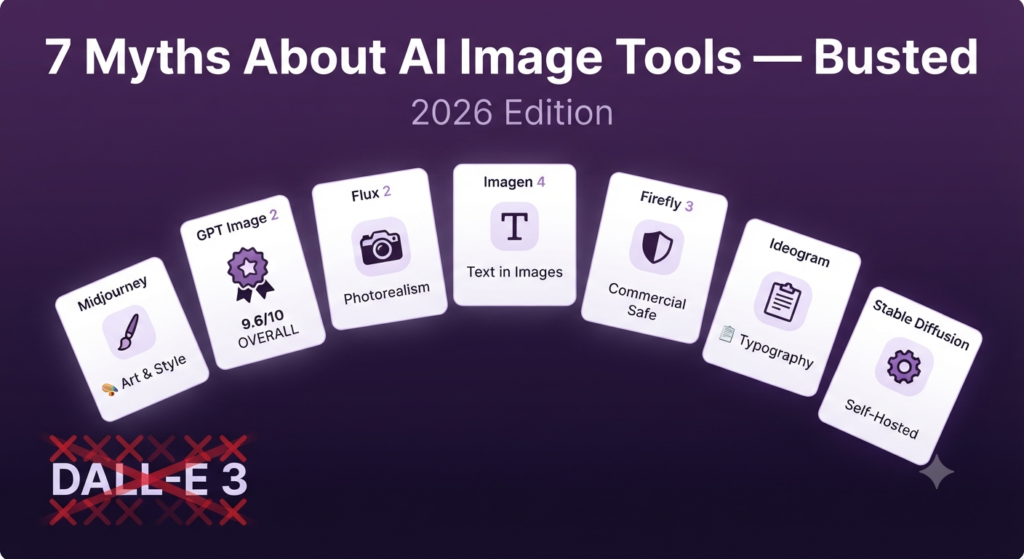
📋 7 Myths Busted in This Article
- ❌ Myth 1 — “Midjourney is still the best AI image generator overall”
- ❌ Myth 2 — “DALL-E 3 is OpenAI’s current image model”
- ❌ Myth 3 — “All AI image generators produce the same kind of output”
- ❌ Myth 4 — “You need expensive subscriptions to get professional-quality images”
- ❌ Myth 5 — “AI-generated images can’t include readable text”
- ❌ Myth 6 — “Adobe Firefly is just a lesser Midjourney”
- ❌ Myth 7 — “The best AI image tool is the one with the highest overall score”
🎨 Myth #1: “Midjourney Is Still the Best AI Image Generator”
❌ The Myth
“Midjourney is the gold standard. If you want the best AI images, you use Midjourney — end of discussion.”
✅ The Truth
Midjourney is the best AI image generator for artistic and stylized creative work. For photorealism, prompt fidelity, text rendering, and overall versatility, other tools now lead — sometimes by a significant margin.
Midjourney built its reputation on something real: it consistently produces the most aesthetically striking images with minimal prompting effort. Its V8.1 update in April 2026 brought sharper textures, HD Mode, and smarter personalization — it remains the go-to for campaign moodboards, editorial art, and concept visuals where aesthetic impact matters more than literal accuracy.
But according to the DIY AI 2026 image generation dataset, GPT Image 2 now scores 9.6/10 overall — the highest in the benchmark — outperforming Midjourney on prompt fidelity, editing capability, text handling, and everyday publishing workflows. Flux 2 from Black Forest Labs leads on photorealism. Google Imagen 4 leads on text rendering and product photography.
The era of one dominant tool is over. Midjourney is excellent, but it’s no longer the default correct answer — it’s the right answer for a specific type of brief.
💡 USE MIDJOURNEY WHEN
Your brief is artistic, stylized, or cinematic — campaign imagery, brand moodboards, concept art, editorial illustrations, character design. Avoid it for product photography, images requiring readable text, or work where literal prompt accuracy is more important than aesthetic appeal.
🗑️ Myth #2: “DALL-E 3 Is OpenAI’s Current Image Model”
❌ The Myth
“I use DALL-E 3 through ChatGPT. It’s the best option for prompt-accurate image generation from OpenAI.”
✅ The Truth
DALL-E 3 is deprecated. OpenAI retired the DALL-E brand entirely. The current model is GPT Image 2, which launched April 21, 2026, and is significantly more capable than its predecessor.
This myth is understandable — most content covering “DALL-E” online was written before April 2026 and hasn’t been updated. But if you’re reading a comparison article in 2026 that ranks DALL-E 3, you’re reading outdated information. According to AIUnpacking’s May 2026 analysis, DALL-E 2 and DALL-E 3 API support ended in May 2026. GPT Image 2 is what you’re using now inside ChatGPT.
GPT Image 2 is a meaningful upgrade. Text rendering accuracy hit approximately 99% with multilingual support — English, Spanish, Japanese, Arabic. The conversational editing flow lets you refine images in natural language (“make the background warmer,” “move the subject left”) rather than rewriting prompts from scratch. For everyday publishing workflows, blog images, social content, and concept visualization, it’s the most accessible and capable tool in its class.
Practical implication: If you’ve been avoiding “DALL-E” because older outputs disappointed you, GPT Image 2 is worth retesting. The jump in quality — particularly for complex prompts and images containing text — is substantial enough that previous conclusions don’t hold.
🎭 Myth #3: “All AI Image Generators Produce the Same Kind of Output”
❌ The Myth
“They all do basically the same thing — text-to-image generation. The differences are minor and mostly aesthetic preference.”
✅ The Truth
The 2026 image generation market has fractured into specialist tools with fundamentally different strengths. Using the wrong tool for a brief is like using a wide-angle lens for a portrait — technically possible, wrong for the job.
The clearest way to see this: run the same prompt across Midjourney V8.1, GPT Image 2, Flux 2, and Adobe Firefly 3. The outputs aren’t variations of the same thing. They’re different interpretations driven by different training data, different optimization targets, and different aesthetic philosophies.
| Tool | Leads On | Weakest At | Best Brief Type | Price from |
|---|---|---|---|---|
| GPT Image 2 OVERALL | Prompt fidelity, text rendering, editing | Distinctive artistic style | Blog images, social, concept visuals | Included in ChatGPT Plus ($20/mo) |
| Midjourney V8.1 | Artistic quality, cinematic feel | Literal prompt accuracy, text in images | Campaign art, editorial, moodboards | $10/month Basic |
| Flux 2 | Photorealism, open-weight flexibility | Beginner accessibility, UI | Product photography, technical images | $0.01–$0.10/image via API |
| Google Imagen 4 | Text rendering, product photography | Artistic stylization | Posters, labels, signage, product shots | Included in Gemini Advanced |
| Adobe Firefly 3 | Commercial licensing clarity | Raw aesthetic quality | Brand work requiring legal safety | $9.99/month (Firefly Standard) |
| Ideogram 3.0 | Text accuracy in images | Photorealism, style range | Posters, thumbnails, logos, stickers | Free tier available |
| Stable Diffusion | Free self-hosting, customization | Out-of-box quality vs. frontier models | Technical users, high-volume, privacy | Free (hardware required) |
“The best AI image generator isn’t the one with the highest score — it’s the one built for your specific brief.”
💸 Myth #4: “You Need an Expensive Subscription for Professional Quality”
❌ The Myth
“Decent AI image generation costs $30–$60/month minimum. Free tools produce garbage, and budget options aren’t usable for professional work.”
✅ The Truth
Professional-quality AI image generation is available for free or near-free in 2026. The economics have changed dramatically, and the price-to-quality relationship looks nothing like it did in 2024.
If you already pay for ChatGPT Plus ($20/month), GPT Image 2 is included — no additional subscription. That’s the top-ranked overall image generator in the 2026 DIY AI benchmark at no marginal cost. Gemini Advanced (also ~$20/month) includes Google Imagen 4, which leads on text rendering and photorealism.
On the API side, Flux 2 Schnell charges as little as $0.01 per image on hosted platforms like fal.ai and Replicate. For occasional professional use — a few blog images per week — that’s effectively zero. Adobe Firefly’s free tier generates a limited number of credits monthly, enough to evaluate quality before committing to a paid plan.
The only scenario where premium-tier spending ($60+/month) makes sense: Midjourney Pro for high-volume creative production with unlimited relaxed generations, or Stable Diffusion self-hosted on a $50/month GPU for 1,000+ images at near-zero per-image cost.
💡 COST REALITY CHECK
Before paying for a dedicated image generation subscription, check what’s already included in your existing AI subscriptions. ChatGPT Plus includes GPT Image 2. Gemini Advanced includes Imagen 4. Canva Pro (if you use it for design) includes Canva AI image generation. You may already have professional-grade image generation you’re not using.
🔤 Myth #5: “AI Image Generators Can’t Produce Readable Text in Images”
❌ The Myth
“AI image generators are useless for anything requiring text — logos, posters, signs, thumbnails. The text always comes out garbled or nonsensical.”
✅ The Truth
Text rendering in AI images is a solved problem in 2026 — for the right tools. GPT Image 2 achieves approximately 99% text accuracy. Google Imagen 4 and Ideogram 3.0 are also specifically strong on readable in-image text.
This myth was entirely true as recently as 2023, when producing an image of a storefront sign reading “OPEN” reliably required post-processing. The models simply weren’t trained for typographic accuracy. That limitation defined the category for years and shaped how designers thought about what AI image tools could and couldn’t do.
In 2026, it’s tool-dependent. GPT Image 2 launched April 2026 with text rendering as a flagship capability — multilingual, including scripts like Arabic and Japanese that are notoriously difficult for image models. Google Imagen 4 specifically targeted text rendering improvements and leads the category for posters, product labels, and signage. Ideogram 3.0 built its entire value proposition around readable text in images — thumbnails, title cards, sticker designs, logo concepts.
Where the myth still applies: Midjourney V8.1 remains inconsistent on text accuracy. Flux 2 and Stable Diffusion can produce readable text with the right settings but aren’t as reliable out of the box. If your brief requires readable text, use GPT Image 2, Imagen 4, or Ideogram — not Midjourney.
🔥 Myth #6: “Adobe Firefly Is Just a Weaker Midjourney”
❌ The Myth
“Adobe Firefly produces inferior images compared to Midjourney or DALL-E. It’s only relevant if you’re already inside the Adobe ecosystem.”
✅ The Truth
Adobe Firefly 3 wins a category no other AI image generator can currently claim: commercially safe output with provable licensing lineage. For professional brand and agency work, that’s not a minor differentiator — it’s the whole decision.
Raw aesthetic quality comparison: Midjourney and Flux 2 produce more visually striking outputs than Firefly 3 on most creative briefs. That’s fair. But aesthetic quality isn’t the only variable that matters in professional creative work — especially for agencies, enterprises, and anyone producing images for commercial use at scale.
Firefly 3 is trained exclusively on licensed content: Adobe Stock, openly licensed material, and public domain imagery. According to Cliprise’s 2026 benchmark, this gives Firefly a clean content provenance that Midjourney, Flux 2, and GPT Image 2 cannot currently claim with the same specificity. For a client project going into a major campaign — billboards, packaging, licensed media — the legal risk profile of Firefly-generated images is meaningfully different from the alternatives.
Firefly also integrates directly into Photoshop and Illustrator via Generative Fill, which changes the workflow entirely. You’re not generating images and importing them — you’re generating within the design tool, which removes a full step and allows non-destructive edits at the pixel level.
The actual choice: Use Midjourney or Flux 2 for internal creative development and exploration. Switch to Firefly for final client deliverables or any content with meaningful commercial exposure. The extra licensing safety is worth the aesthetic trade-off on work that has real legal stakes.
🏆 Myth #7: “The Best Tool Is the One With the Highest Overall Score”
❌ The Myth
“Just pick the tool that benchmarks highest overall. That’s the best one — period.”
✅ The Truth
Overall benchmark scores aggregate across use cases you may never use. The right tool is the one that scores highest on the specific output type you’re producing — and using the wrong high-scorer is worse than using the right lower-scorer.
GPT Image 2 scores 9.6/10 overall in the 2026 DIY AI benchmark — the highest of any model. If that framing drives your decision, you’ll use GPT Image 2 for everything. And for most general use cases, that’s a defensible choice. But “overall score” aggregates across prompt fidelity, realism, text handling, editing capability, style range, and commercial safety — weighted by the benchmark’s assumptions about what matters.
If 90% of your use case is campaign moodboards and editorial art, Midjourney’s overall lower benchmark score is irrelevant. It produces the most aesthetically distinctive outputs for creative art direction — a dimension where GPT Image 2’s strength in literal prompt accuracy becomes a weakness. If your use case is high-volume product photography for e-commerce, Flux 2’s technical control and per-image economics are what matter, regardless of its overall ranking.
The right framework isn’t “which tool scores highest.” It’s “which tool scores highest on my specific output type, within my budget, with the workflow I can actually maintain.”
✅ Which One Is Actually Right for You?
- You need the best all-around tool for general use → GPT Image 2 (included in ChatGPT Plus)
- You create campaign art, editorial visuals, or concept imagery → Midjourney V8.1 (from $10/month)
- You need photorealistic product or architectural images → Flux 2 via API ($0.01–$0.10/image)
- You need images with readable text — posters, thumbnails, signs → GPT Image 2 or Ideogram 3.0
- You produce images for commercial use with legal exposure → Adobe Firefly 3 (from $9.99/month)
- You want free self-hosted generation at volume → Stable Diffusion (requires GPU setup)
- You want high-quality images at near-zero cost via API → Flux 2 Schnell on fal.ai or Replicate
❓ Frequently Asked Questions
Is Midjourney still worth paying for in 2026?
Yes — for specific use cases. If your work involves artistic direction, creative campaigns, editorial imagery, or any brief where aesthetic distinctiveness matters more than literal accuracy, Midjourney V8.1 still produces the most striking outputs in the market. It’s not the best overall tool anymore, but it’s still the best tool for its specific category. At $10/month for Basic, it’s low-risk to test against your actual briefs.
What happened to DALL-E 3? Can I still use it?
DALL-E 3 has been deprecated by OpenAI. API support ended in May 2026. The current OpenAI image model is GPT Image 2, which launched April 21, 2026, as part of “ChatGPT Images 2.0.” If you’re using image generation inside ChatGPT, you’re already using GPT Image 2 — OpenAI migrated users automatically. Content comparing DALL-E 3 to current tools is outdated.
Are AI-generated images legal to use commercially in 2026?
For most paid plans: yes, with caveats. Midjourney grants commercial rights from the Basic plan ($10/month). GPT Image 2 output is yours to use under OpenAI’s current terms. Adobe Firefly 3 provides the cleanest licensing because it’s trained on licensed content — making it the most defensible choice for high-stakes commercial work. Stable Diffusion’s licensing varies by model variant and training dataset. Always verify current Terms of Service before commercial use — policies evolve frequently in this space.
How good is AI image generation for product photography in 2026?
Significantly better than two years ago, but still tool-dependent. Flux 2 leads on photorealism and is the strongest option for product imagery requiring realistic materials, lighting, and detail. Google Imagen 4, released April 2026, specifically targeted product photography improvements. For straightforward e-commerce product shots, both are viable production tools. For anything requiring careful brand consistency, complex lighting setups, or specific product configurations, AI generation is still most valuable as a creative starting point requiring human refinement.
What’s the cheapest way to get professional-quality AI images in 2026?
Three options depending on your volume. If you already pay for ChatGPT Plus ($20/month), GPT Image 2 is included at no additional cost. For API-based generation, Flux 2 Schnell starts at $0.01 per image on fal.ai — the cheapest premium option in the market. For free experimentation, Ideogram 3.0 has a generous free tier that’s particularly strong for text-in-image use cases. Self-hosting Stable Diffusion is free per-image but requires hardware investment and setup time.