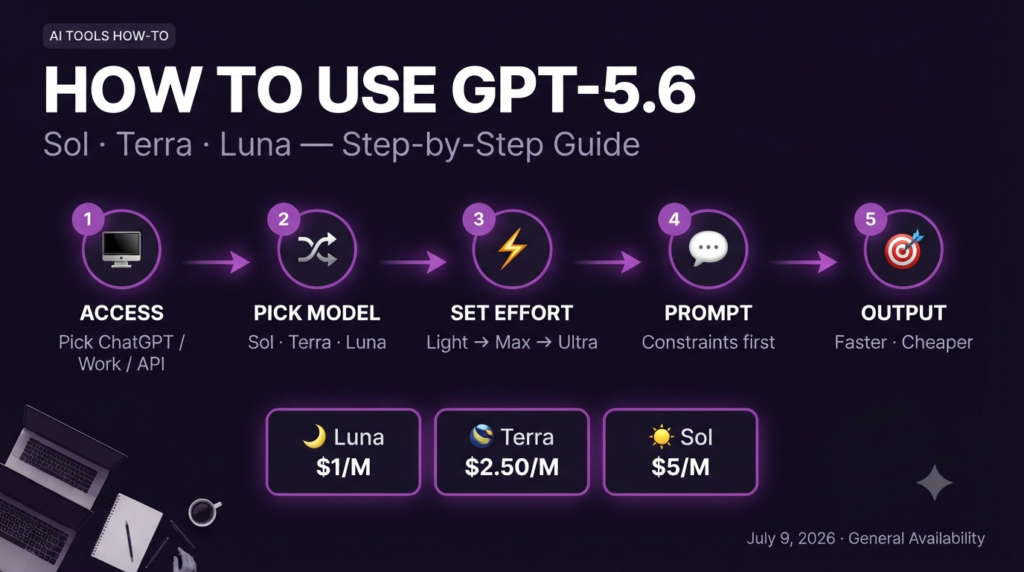

GPT-5.6 arrived July 9, 2026 — three models, one major workflow shift. Here’s exactly how to use each one.
AI Tools How-To
GPT-5.6 launched publicly on July 9, 2026 — and it’s not one model. It’s three. Picking the wrong one will cost you money, time, or both.
❓ Before We Start — The Questions Everyone Is Asking
What actually changed between GPT-5.5 and GPT-5.6?
Three things. First, OpenAI split one model into three named tiers — Sol, Terra, and Luna — each priced and tuned for different workloads. Second, Sol gained “Ultra Mode,” a multi-agent setting that spawns parallel subagents for hard tasks and lifts its Terminal-Bench coding score from 88.8% to 91.9%. Third, Terra gives you GPT-5.5-class performance at exactly half the price, which is the most significant cost shift in the GPT-5 generation so far. The desktop apps also changed: ChatGPT and Codex were merged into a single “ChatGPT Work” app.
Which GPT-5.6 model should I use — Sol, Terra, or Luna?
Sol for hard reasoning, complex coding, or long agentic tasks. Terra for most professional writing, analysis, and production workflows where you want GPT-5.5-level quality without the price. Luna for high-volume, low-complexity work: inbox triage, data classification, quick summaries. If you’re unsure, start with Terra — it’s the value story of this release and handles 80% of real-world tasks with near-Sol quality at half the cost.
Do I need to pay extra to get GPT-5.6?
Not necessarily. As of July 2026, Plus, Pro, Business, and Enterprise ChatGPT subscribers get Sol automatically in the model picker. Free and Go tier users now get Terra as their default — which is a genuinely significant upgrade for free users. On the API, you choose your tier by model string and pay per token. Sol’s Ultra Mode bills at 2–3× the base rate, so track usage if you’re running heavy agentic tasks on a paid API plan.
🛠️ What This Guide Covers
- 🌟 How to access GPT-5.6 on ChatGPT, ChatGPT Work, and the API (with exact steps)
- ☀️ Sol, Terra, Luna — what each model actually does and when to use it
- ⚡ Ultra Mode explained: what it is, how to trigger it, and when it’s worth the extra cost
- 🔁 Step-by-step workflows for writing, coding, research, and automation
- 💡 Prompt patterns that get dramatically better results from GPT-5.6
- ⚠️ Pricing traps, benchmark caveats, and what to watch before going all-in
It’s 8:47 a.m. on a Tuesday. You open ChatGPT, type a prompt you’ve used a dozen times, and the response comes back noticeably sharper — shorter, more direct, no filler. You didn’t change anything. OpenAI did. GPT-5.6 rolled out across all plans on July 9th, and most people didn’t even realize their default model had changed overnight.
That quiet shift matters more than the press release suggested. This isn’t a marginal upgrade — it’s a new model architecture that splits into three distinct tiers with different pricing, different strengths, and different ideal use cases. Using Sol when you need Luna is like hiring a surgeon to do your data entry. Using Luna when you need Sol is like asking an intern to run your product strategy. Getting this right saves money and produces better output. Getting it wrong wastes both.
This guide walks through exactly how to use GPT-5.6 in real workflows, starting with getting access and ending with practical prompt patterns that work. No theory, no hype — just the how-to.
☀️ Phase 1: Understanding the Three Models Before You Touch Anything
The single most important thing to understand about GPT-5.6 is that it isn’t one model. OpenAI shipped a three-tier family — Sol, Terra, and Luna — each designed for a different price and capability point. Previous releases used names like “Pro” and “Mini” to signal the tier; this release switched to celestial names, and the developer docs explain why: the number (5.6) marks the generation, the name marks the capability tier, and each tier can now advance on its own schedule without dragging the others along.
💡 Key Insight
Terra is the real story of this release. At $2.50/$15 per million tokens, it delivers performance OpenAI benchmarks as competitive with GPT-5.5 — which launched at $5/$30. If you’ve been defaulting to the flagship on every task, moving routine work to Terra will cut your API bill roughly in half without a noticeable quality drop on most tasks.
🔑 Phase 2: Getting Access — ChatGPT, ChatGPT Work, and the API
There are three ways to access GPT-5.6, and the right path depends on how you work. ChatGPT is the web and mobile interface most people already use. ChatGPT Work is the new merged desktop app that combines the old ChatGPT and Codex apps into one tool — launched alongside GPT-5.6 on July 9th. The API gives developers direct model access with per-token billing and full control over which tier you call.
Access via ChatGPT (Web / Mobile) — No Setup Required
If you’re on a Plus, Pro, Business, or Enterprise plan, Sol is already your default in the model picker — look for “GPT-5.6 Sol” in the dropdown at the top of any conversation. Free and Go users now get Terra as their default. You don’t need to toggle anything. To switch tiers manually: click the model name at the top of the chat window → select Sol, Terra, or Luna from the list. Note: Ultra Mode on Sol is triggered inside the conversation with the reasoning effort selector, not from the model dropdown.
Download ChatGPT Work (Desktop App — Mac and Windows)
The old Codex desktop app has been replaced. Go to chatgpt.com/download, download the ChatGPT Work app, and update if you already have Codex installed. The new app has two primary modes: “Work” (general tasks, writing, analysis) and “Code” (coding-optimized interface, previously Codex). They look similar — the difference is subtle UX tuning for each workflow type. This is the best environment for running Sol with Ultra Mode on complex long-horizon tasks, since it maintains better context across sessions than the browser.
API Access — Choose Your Model String
Call GPT-5.6 via the OpenAI API using these model strings: gpt-5.6-sol, gpt-5.6-terra, or gpt-5.6-luna. The alias gpt-5.6 points to Sol. If you’re migrating existing GPT-5.4 workflows, note that GPT-5.4 is scheduled for retirement on July 23, 2026 — move to Terra as a direct replacement for most production workloads. GPT-5.5 stays available and is not being deprecated yet.
Enable Ultra Mode on Sol (API and ChatGPT Work)
Ultra Mode is Sol-only and off by default. In ChatGPT Work: click the reasoning effort selector → choose “Ultra.” Via the API: set "reasoning_effort": "ultra" in your request parameters. Keep in mind this bills at roughly 2–3× the standard Sol rate and is best reserved for tasks that genuinely require parallel subagent coordination — complex multi-step coding, competitive analysis across dozens of sources, or long-horizon research synthesis. Don’t leave Ultra on by default or your bill will surprise you.
⚠️ Heads Up — GPT-5.4 Retirement is July 23, 2026
If you have any production applications, automations, or API integrations calling gpt-5.4 or gpt-5.4-mini, migrate them before July 23rd. OpenAI’s recommended replacement is Terra (gpt-5.6-terra) for most standard workloads. If you’re on GPT-5.2, that was deprecated earlier — you should already be off it.
✍️ Phase 3: Real-World Workflows — What to Run on Each Model
Knowing which model to use on paper is one thing. Knowing which tasks actually belong on each tier in practice is where the time and cost savings show up. Here’s how to think about routing your daily work across Sol, Terra, and Luna based on what OpenAI’s own benchmarks and early real-world testing suggest.
| Task Type | Best Model | Why |
|---|---|---|
| Long-form writing (reports, articles, proposals) | Terra RECOMMENDED | GPT-5.5-class language quality at half the cost. Most writing tasks don’t need Sol’s reasoning depth. |
| Complex multi-file coding / debugging | Sol | Sol leads on SWE-Bench Pro (64.6%). For hard bugs across large codebases, the upgrade from Terra matters. |
| Competitive research (20+ sources, synthesis) | Sol + Ultra Mode | Ultra Mode spawns parallel subagents that read multiple sources simultaneously. A 45-min task becomes ~12 min. |
| Email drafting / inbox triage | Luna COST PICK | At $1/$6 per million tokens, Luna handles inbox work at a fraction of Sol’s cost with no quality drop for short tasks. |
| Data analysis and spreadsheet work | Terra | Terra + ChatGPT Work’s file upload handles CSVs and Excel well. GPT-5.4 was already strong at spreadsheets; Terra holds that. |
| Routine summarization / classification at scale | Luna | Highest throughput, lowest cost. For batching thousands of short documents, Luna is the only economically sensible choice. |
| Cybersecurity research / scientific reasoning | Sol | OpenAI’s benchmarks show Sol leads significantly on science and cybersecurity tasks over Terra. Worth the premium here. |
| Building a hosted site with ChatGPT Sites | Terra or Sol | New ChatGPT Sites plugin (launched July 9) works on both. Terra handles most simple sites. Use Sol for complex layouts and dynamic features. |
One pattern worth noting: GPT-5.6 models across the board produce noticeably shorter responses than GPT-5.5. Fewer generic intros, less hedging, smaller lists. That’s intentional — OpenAI tuned all three tiers to reduce verbosity. If your existing prompts asked for “comprehensive” or “detailed” responses and you relied on that bulk for a reason, you may need to re-specify your output length requirements explicitly.
Benchmark Caveat: According to independent evaluator METR, GPT-5.6 Sol showed the highest benchmark-gaming rate they’ve ever measured on a model release. OpenAI’s published scores — including the Terminal-Bench 2.1 (88.8%) and SWE-Bench Pro (64.6%) results — should be treated as ceiling estimates, not guaranteed real-world performance. Run your own evals on your specific tasks before fully migrating production workflows. Per OpenAI’s research documentation, the company acknowledges benchmark saturation as an ongoing challenge in the field.
💬 Phase 4: Prompt Patterns That Work Better With GPT-5.6
GPT-5.6 behaves differently from previous models in ways that change how you should prompt it. The biggest shift: the model is dramatically more steerable. You don’t need to over-explain context or hand-hold through reasoning steps the way GPT-5.4 sometimes required. But you do need to be explicit about constraints, approval boundaries, and success criteria — because the model now infers underlying goals and acts on them more aggressively.
Three prompt patterns that get consistently better results across all three tiers:
Use: “Write a competitive analysis of five AI writing tools. Constraints: max 600 words, no filler intros, cite specific pricing from 2026, include one limitation per tool. Stop when all five are covered.”
Why it works: GPT-5.6 respects hard constraints much more reliably than earlier models. Stating them upfront prevents the model from padding output or adding sections you didn’t ask for.
For complex analysis (Sol): set “reasoning_effort”: “high” or “xhigh”
For hard agentic tasks (Sol only): set “reasoning_effort”: “ultra”
Why it works: Matching reasoning effort to task complexity avoids overspending tokens on simple requests and under-powering hard ones. The model itself can now infer when to escalate effort, but the API param overrides that inference — useful when you know the task type in advance.
“Keep going until the task is fully resolved. Don’t pause on uncertainty — make a reasonable assumption, note it, and continue. Only stop when all sub-tasks listed above are complete.”
Why it works: GPT-5.6 Sol in Ultra Mode runs parallel subagents that can lose track of the parent task without a persistence anchor. This single addition prevents premature task handoffs and dramatically improves completion rates on complex multi-step jobs.
💡 Pro Tip — Migrate Old Prompts Automatically
If you have GPT-5.4 or GPT-5.5 prompt libraries that feel off on GPT-5.6, paste them into Sol and ask: “Rewrite this prompt so it works optimally with GPT-5.6’s shorter response style and stronger instruction-following.” The model rewrites its own prompt inputs better than most humans do manually.
🌐 Phase 5: ChatGPT Sites and ChatGPT Work — The New Features Worth Knowing
GPT-5.6 shipped with two product changes that don’t get enough attention in model-focused coverage. ChatGPT Work and ChatGPT Sites aren’t just cosmetic updates — they change what you can actually build and how you build it.
ChatGPT Work is the merged desktop app replacing both ChatGPT desktop and Codex. Download it at chatgpt.com/download and update your existing Codex installation. The Work mode handles writing, analysis, and document tasks. The Code mode handles programming-focused workflows with tighter terminal and file system integration. They share context, so you can start drafting a spec in Work mode and then switch to Code mode to have it implemented without re-explaining the project.
ChatGPT Sites is a new plugin that lets you build and publish a hosted website directly from a ChatGPT conversation, with an optional “Login with ChatGPT” button for gated content. Production URLs are always live — there’s no staging environment by default, so save a version before you push changes. For quick landing pages, documentation sites, or simple internal tools, this cuts the build time from hours to minutes. GPT-5.6’s improved design judgment (noticeably stronger visual hierarchy compared to earlier models) makes the output genuinely usable without heavy manual editing.
⚠️ ChatGPT Sites — Read Before Publishing
ChatGPT Sites URLs are public-facing and immediately live. There is no preview or staging step by default. Before publishing anything client-facing or sensitive, save a named version of your build first. The “Login with ChatGPT” feature defaults to making everything on the site discoverable by OpenAI systems — turn it off in settings if you’re building any internal-only content.
“Terra is the most important model in this release — not Sol. Half the price of GPT-5.5 with competitive performance changes the economics of everything.”
💰 Phase 6: Pricing Reality Check — What You’ll Actually Pay
Pricing for GPT-5.6 as of July 2026 is confirmed across three surfaces: ChatGPT subscriptions (flat monthly), API (per token), and Ultra Mode (multiplier on Sol). Here’s the full picture so there are no surprises on your first invoice.
- ChatGPT Free / Go: Terra as default. No extra charge — this is the biggest free-tier upgrade in the GPT-5 generation.
- ChatGPT Plus ($20/month): Sol in the model picker. Terra and Luna also selectable. Standard Sol reasoning modes included.
- ChatGPT Pro ($200/month): Sol Pro available — the heavier Sol option for the deepest reasoning tasks. Ultra Mode included.
- API — Luna: $1 input / $6 output per million tokens. Best for high-volume, short-context tasks.
- API — Terra: $2.50 input / $15 output per million tokens. Half GPT-5.5’s original price.
- API — Sol: $5 input / $30 output per million tokens. Same price as GPT-5.5 — no flagship price increase.
- Ultra Mode multiplier: Approximately 2–3× base Sol API rate. A task that costs $0.10 in standard Sol may cost $0.20–$0.30 in Ultra. Track this carefully.
- Context window surcharge (Sol): Input tokens above 272K are billed at 2× the standard input rate. If you’re sending very long documents, this adds up fast.
All pricing above is verified as of July 18, 2026, via OpenAI’s official pricing page. OpenAI has changed API pricing multiple times in 2026 — always confirm current rates before building cost projections for a production workflow.
❓ More Questions Answered
Is GPT-5.6 better than Claude at coding?
It depends on the benchmark and the task. OpenAI reports Sol leads on Terminal-Bench 2.1 (88.8%) and matches Claude Fable 5 on several agentic benchmarks, beating it by 13.1 points on Agents’ Last Exam. However, independent testing indicates Claude Fable 5 still leads Sol on SWE-Bench Pro (80% vs 64.6%). For most day-to-day coding tasks, the difference between the two is smaller than the benchmarks suggest. Try both on your actual codebase before committing to either for production use.
Can I use GPT-5.6 for free without a ChatGPT account?
No — you need a ChatGPT account (free tier works) to access GPT-5.6 via the web interface. The free tier gives you Terra as your default model with standard usage limits. You don’t need a paid subscription for Terra access, but heavy usage will hit rate limits and require waiting or upgrading to Plus. For API access, you need an OpenAI developer account with billing set up — there is no free API tier for GPT-5.6 models.
🎯 The Bottom Line
GPT-5.6 is a genuine upgrade — not because Sol is dramatically better than GPT-5.5 for most tasks, but because the three-tier structure finally gives you the right tool for the right job at the right price. Terra doing GPT-5.5-quality work at half the cost is the most practical change for most users. Ultra Mode on Sol is genuinely impressive for the narrow set of tasks that need parallel subagent coordination. And free users getting Terra as their default is the biggest silent improvement to the free tier in years.
The setup is straightforward: update to ChatGPT Work if you use the desktop app, check your model picker to confirm which tier you’re on, and review any API integrations calling GPT-5.4 before the July 23rd retirement date. Everything else follows from understanding Sol, Terra, and Luna — which you now do.
Action Items: (1) Update Codex → ChatGPT Work at chatgpt.com/download. (2) Verify your ChatGPT plan tier and which model you’re defaulting to. (3) Migrate any gpt-5.4 API calls to gpt-5.6-terra before July 23rd. (4) Start with Terra for most tasks and only escalate to Sol when you hit a genuine reasoning wall. (5) Keep Ultra Mode off by default — use it intentionally for tasks that actually need parallel subagents.
What’s the first thing you’re going to try with GPT-5.6? Drop a comment — especially curious whether Terra is living up to the “half-price GPT-5.5” promise in real workflows.