
Prompt Engineering in 2026: The Skills Separating Average Users from Expert AI Operators
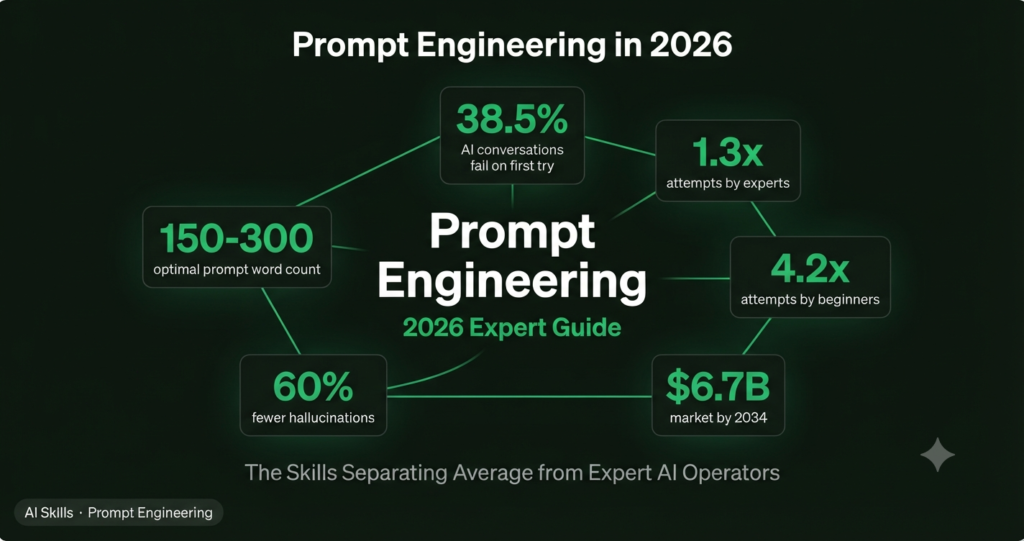
of all AI conversations in 2026 involve iterative refinement — meaning the first prompt failed, and the user had to try again. Expert prompt engineers need just 1.3 attempts on average. Everyone else needs 4.2.
Source: UCStrategies AI Usage Report, March 2026📋 What This Deep-Dive Covers
- 🧠 Why prompt engineering in 2026 is fundamentally different from 2023
- 🏗️ The four elements every high-performance prompt must contain
- ⚙️ Model-specific techniques for Claude, ChatGPT, and Gemini
- 🔬 Advanced patterns: chain-of-thought, few-shot, role prompting — when each actually works
- 📐 Context engineering: the discipline that replaced prompt engineering at the expert level
- 🚫 The prompt mistakes that waste the most time — and the exact fixes
Two years ago, prompt engineering was a party trick. Drop “act as a senior copywriter” in front of any request and watch the quality jump. That gap has closed. The frontier models in 2026 read intent well enough that casual users get decent outputs without knowing any technique at all. So why does the skill still matter — and matter more than ever?
Because decent isn’t the same as precise. The gap between a mediocre output and an expert one isn’t closing — it’s widening. As the models get more capable, the ceiling on what a well-engineered prompt can produce keeps rising. The question isn’t whether prompt engineering works. It’s whether you’re operating near the ceiling or the floor.
🔄 Why 2026 Prompt Engineering Is a Different Discipline
In 2023, prompt engineering was about tricks: magic phrases, role assignments, jailbreak-adjacent patterns that coaxed better outputs from models that needed a lot of hand-holding. In 2026, the discipline has split cleanly into two levels.
The first level — casual prompting — is what anyone does. State your request clearly, maybe add context. The models handle this fine. The quality ceiling here is “good enough.”
The second level is what practitioners call context engineering. Instead of optimizing a single prompt, you design the entire information environment the model operates in: what knowledge it has access to, what tools it can call, what memory it retains, and how outputs from one step become inputs to the next. According to Anthropic’s 2026 prompt engineering guide, context engineering has emerged as the natural evolution — the next level above individual prompt craft.
The most important mindset shift: stop thinking of AI as a black box that reads minds. It reads tokens. Every failure is a prompt design problem, not a model limitation. Research published by Levy, Jacoby, and Goldberg in 2024 found that LLM reasoning performance starts degrading around 3,000 tokens — well below technical maximums. The practical sweet spot for most prompts is 150–300 words. Not longer. More structured.
Andrej Karpathy’s framing (2025), now widely adopted among practitioners: the LLM is a CPU, the context window is RAM, and your job as a prompt engineer is to be the operating system — loading working memory with exactly the right code and data for each task. The real failure mode in production isn’t a bad prompt. It’s the wrong context.

🏗️ The Four Elements Every High-Performance Prompt Must Contain
Every reliable, high-quality prompt contains four elements. Miss one and you’re leaving output quality on the table. The order matters: setting role and context before the task gives the model the frame it needs before it starts generating.
1. Role — Tell the model who it is. Not “you are a helpful assistant” — that’s the default. “You are a senior B2B copywriter with 10 years of experience writing for SaaS companies targeting mid-market buyers. You write with authority and zero filler.” Specificity in role assignment shifts the model’s vocabulary, reasoning style, and confidence threshold.
2. Context — Give the model what it can’t know. Your audience, the purpose of the output, the constraints that apply, what success looks like. The model doesn’t know your situation. Every assumption it has to make is a risk of misalignment. Remove the assumptions.
3. Task — State what you want in direct, unambiguous language. Use positive framing over negation. “Only use real data” consistently outperforms “don’t hallucinate” — this is sometimes called the Pink Elephant Problem: telling a model not to do something forces it to process that concept first.
4. Format — Specify the exact output structure. “Respond in bullet points,” “format as a markdown table,” “return JSON only,” “write in flowing prose with no lists.” Explicit format instructions eliminate ambiguity and remove a full category of failure.
Example — Weak vs Strong Prompt💡 PRO TIP
Give the AI explicit permission to express uncertainty: “If the data is insufficient to draw a conclusion, say so rather than speculating.” This single addition reduces hallucinations by up to 60% on factual tasks, according to Anthropic’s usage research. Most people never add this — and wonder why the model confidently invents things.
⚙️ Model-Specific Techniques: Claude vs ChatGPT vs Gemini
The single biggest mistake intermediate prompt engineers make in 2026 is using the same prompting approach across all models. Each major model has been trained differently, evaluated differently, and responds to structure differently. Model-specific optimization isn’t optional — it’s mandatory at the expert level.
Claude responds best to explicit XML-style structure and contract-style instructions. Tags like <task>, <context>, and <format> help Claude parse complex instructions without ambiguity. Claude also excels at critique and evaluation steps — if you want it to check its own work, it does so more reliably than other models. According to Lakera’s 2026 prompt engineering analysis, Claude benefits from semantic clarity more than full wording detail. Detailed system prompts in Claude Projects compound in value across sessions — treat that project system prompt like production code.
ChatGPT (GPT-5.5) handles more ambiguity than earlier versions but still benefits significantly from structured output specifications. For reasoning-heavy tasks, add “use <scratchpad> tags to work through the logic before answering” — GPT will dump intermediate reasoning there and deliver a cleaner final output. Particularly strong at creative tasks, ad copy, and structured data outputs.
Gemini shines with hierarchy — start broad, then zoom in. Benefits from explicit grounding instructions when working with retrieved documents. Particularly effective for multimodal prompts combining text and images. For research tasks, Gemini’s response to explicit verification steps (“check this claim against what you know before including it”) is notably strong.
| Technique | Claude | ChatGPT GPT-5.5 | Gemini | Best Use Case |
|---|---|---|---|---|
| XML structure tags BEST | ✅ Excellent | ✓ Good | ✓ Good | Complex multi-part instructions |
| Role prompting | ✅ Excellent | ✅ Excellent | ✓ Good | Creative + open-ended tasks |
| Chain-of-thought | ✅ Excellent | ✅ Excellent | ✅ Excellent | Multi-step reasoning tasks |
| Few-shot examples | ✅ Excellent | ✅ Excellent | ✓ Good | Tone/format matching |
| Scratchpad reasoning | — (built-in) | ✅ Excellent | ✓ Good | Logic-heavy, analytical tasks |
| Hierarchical structure | ✓ Good | ✓ Good | ✅ Excellent | Research, document analysis |
| Uncertainty permission | ✅ Excellent | ✅ Excellent | ✓ Good | Any factual or data task |
🔬 Advanced Patterns: When Each Technique Actually Works
Advanced prompting literature is full of techniques that work brilliantly in benchmarks and inconsistently in practice. Here’s the honest picture of when each one is worth your time in 2026.
Chain-of-Thought (CoT) — Adding “think step by step” or “reason through this before answering” genuinely improves accuracy on multi-step reasoning, complex math, and logical deduction. The key caveat: skip explicit CoT for models running in extended thinking / reasoning mode (Claude’s extended thinking, GPT o3, Gemini Thinking Mode). These models already reason internally. Adding “think step by step” to a reasoning model is like telling someone who’s already thinking to please start thinking. It adds tokens and can actually constrain the model’s natural reasoning process.
Few-Shot Examples — More reliable than lengthy descriptions of quality. If you want a specific tone, structure, or format, showing the model one example outperforms describing that example in three paragraphs. Start with one example (one-shot). Only add more if the output still doesn’t match. Three examples cover 95% of use cases. More than five rarely adds value and costs context window space.
Role Prompting — Genuinely useful for open-ended and creative tasks. Has negligible effect on classification and factual QA tasks — the model’s accuracy on “what is the capital of France” doesn’t improve because you told it to be a geography expert. Don’t cargo-cult role prompts into every request. Use them deliberately for tasks where style, expertise, and judgment matter.
Tree of Thought / LATS — Skip these unless you have a specific, high-stakes task that justifies the compute cost and implementation complexity. For 99% of real-world use cases, structured chain-of-thought prompting delivers the same quality improvement at a fraction of the token cost.
“Prompt engineering didn’t get simpler in 2026 — it got more consequential. The models forgive bad prompts. They reward great ones exponentially.”
📐 Context Engineering: The Expert-Level Discipline
Context engineering is the 2026 evolution of prompt engineering. Rather than crafting a single perfect prompt, you design the entire information environment the model operates in — what documents are retrieved (RAG), what tools are available, what the agent’s memory contains, and how outputs from one step become inputs to the next.
For individual users rather than developers, context engineering has three practical applications that deliver immediate value without any technical setup.
System Prompts as Persistent Context: Both Claude Projects and ChatGPT Custom GPTs support system prompts that apply to every conversation. This is the single highest-ROI change any professional AI user can make. Build a system prompt that encodes your role, your audience, your style, and your output preferences. Every conversation starts with full context already loaded. Version it. Test it. Update it quarterly. Treat it like production code because functionally, it is.
Multi-Turn Memory Prompting: Instead of compressing all context into a single giant prompt (which degrades reasoning past ~3,000 tokens), build understanding across turns. In the first message, establish role and context. In the second, provide the task. In the third, request the format and critique. This layered approach consistently outperforms single-prompt everything on complex tasks.
Output as Input: The most underused technique in non-developer workflows. Take Claude’s output from one step and feed it explicitly as input to the next step with a new task. “Given this outline you just created, now write Section 2 as if you were writing for someone who has tried and failed at this before.” Chaining outputs creates compound quality improvement across a workflow.
⚠️ CRITICAL WATCH-OUT
Multi-turn memory prompting only works if the model platform supports session persistence or you explicitly re-inject context in each message. Claude Projects and ChatGPT Custom GPTs both support this natively. Standard chat sessions without Projects or Custom GPTs start fresh — the model has no memory of previous conversations, only the current session history.
🚫 The Prompt Mistakes That Waste the Most Time
- Vague task definition — “Write something about X” gives the model permission to guess your intent. It will guess wrong. State the specific output you want.
- Negative instructions without positive alternatives — “Don’t use jargon” is weaker than “Use plain English that a non-technical manager can act on immediately.”
- No format specification — The model defaults to bullet points for everything because bullets performed well in training feedback. If you want prose, say so explicitly.
- Prompting reasoning models to reason out loud — Adding chain-of-thought instructions to Claude Extended Thinking or GPT o3 degrades rather than improves performance.
- Treating hallucination as a model problem — Hallucination is almost always a prompt design problem. Adding uncertainty permission and source constraints eliminates most of it.
- One giant prompt instead of a workflow — Long single prompts past 3,000 tokens degrade reasoning. Break complex tasks into chained steps.
- No system prompt — Starting every conversation from zero when you have a consistent use case is like reintroducing yourself to a colleague every morning.
❓ Frequently Asked Questions
Is prompt engineering still a valuable skill now that AI models are so much smarter?
More valuable than ever — but for different reasons. In 2023, prompt engineering compensated for model limitations. In 2026, it exploits model capabilities. The ceiling on what a well-engineered prompt can produce keeps rising as the models improve. The gap between casual and expert outputs isn’t closing; it’s widening. According to PromptPrepare’s 2026 analysis, Claude Opus 4.8 and GPT-5.5 are extraordinarily capable and extraordinarily sensitive to how you ask — the skill compounds.
How long should a prompt be in 2026?
The research sweet spot is 150–300 words for most tasks. LLM reasoning performance begins degrading around 3,000 tokens, well below technical context maximums. Structure beats length: a 200-word prompt with clear role, context, task, and format specifications outperforms a 600-word prompt that’s just vaguely detailed. Start structured and concise, then add specificity only where outputs fail.
What’s the difference between prompt engineering and context engineering?
Prompt engineering optimizes a single input. Context engineering designs the full information environment — documents retrieved via RAG, tools available to the agent, memory across sessions, and how step outputs feed into step inputs. For individual users without technical setup, context engineering means building a strong system prompt in Claude Projects or a Custom GPT, and structuring multi-turn conversations deliberately rather than dumping everything into one message.
Which AI model is best for which type of task in 2026?
Based on independent practitioner testing: Claude for analytical depth, nuanced writing, document analysis, and code review — particularly strong where reasoning quality and accuracy matter over speed. ChatGPT (GPT-5.5) for creative content, structured data outputs, and tasks requiring ambiguity tolerance. Gemini for multimodal tasks combining text and images, research with explicit verification steps, and hierarchically structured information. Most expert users run all three and match the model to the task rather than picking one default.
Do I need to learn to code to get good at prompt engineering?
No. Production-level prompt engineering for individual professional use requires no coding knowledge. The techniques covered in this guide — role specification, context loading, format instructions, chain-of-thought, few-shot examples, system prompts — are all natural language skills. Coding becomes relevant only if you’re building applications that call AI APIs programmatically, or implementing RAG systems and agentic workflows at scale.
🏁 Where to Start This Week
One change delivers more value than anything else: build a system prompt for your most common AI use case and save it in Claude Projects or a ChatGPT Custom GPT. Encode your role, your audience, your output style, and your most important constraints. Stop reintroducing yourself to the model in every session.
After that, pick one task you run through AI every week and apply the four-element structure — role, context, task, format — to your current prompt. Compare the output quality to what you’ve been getting. The gap is usually immediate and significant.
The global prompt engineering market is projected to reach $6.7 billion by 2034. That’s not because companies are hiring people to type into chatbots — it’s because designing precise, reliable AI instructions has become a core professional competency across every knowledge work role. The people building that skill now are the ones who’ll be most effective as the models keep improving.
💡 YOUR ACTION ITEM
Take your most common AI prompt — the one you use most days — and rewrite it using the four-element structure from this article. Add a role, explicit context, a positively framed task, and a format specification. Run it side by side with your original. That comparison is your prompt engineering education in one exercise.