
How to Use AI for Content Marketing in 2026 (The Step-by-Step System That Actually Works)
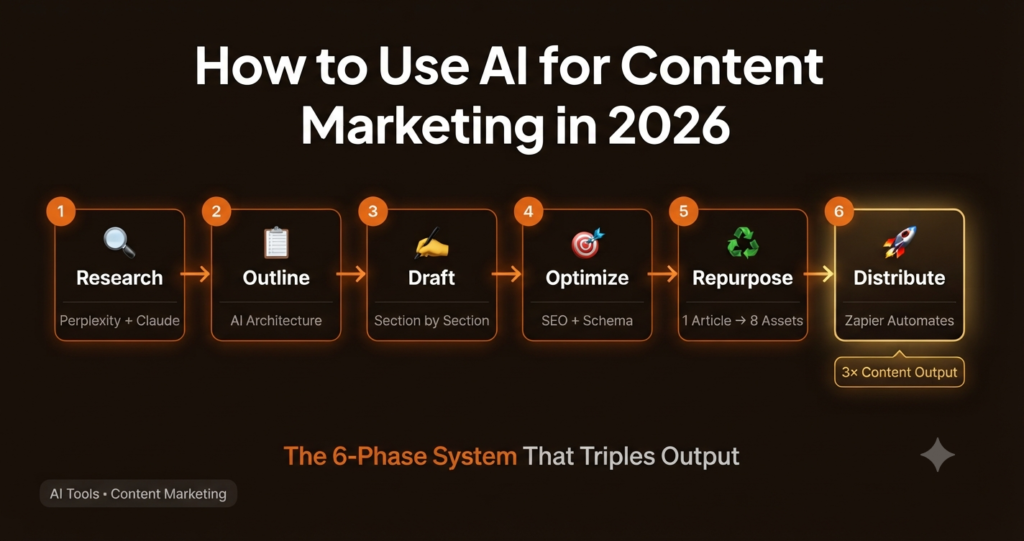
Most “AI for content marketing” guides give you a list of tools and leave you to figure out how they fit together. That’s not a system — it’s a shopping list. What actually moves the needle is a sequential workflow where each phase feeds the next. That’s what this guide covers: six phases, in order, with the right tools for each one.
You don’t need to implement all six phases immediately. Phases 1 through 3 alone will cut your content production time by roughly half. Add Phases 4 through 6 and you have a complete content engine.
Phase 1 — Research: Know Exactly What to Write Before You Write Anything
The biggest content mistake small teams make isn’t bad writing — it’s writing about topics nobody is searching for. AI research tools solve this by surfacing what your audience is actually asking before you spend time creating content around it.
💡 PRO TIP
Ask Claude or ChatGPT to analyze your competitor’s top-ranking pages and identify topic gaps — content your competitors rank for that you don’t cover yet. Paste the competitor’s sitemap or top pages list and prompt: “What topics are covered here that I should write about?”
Phase 2 — Outlining: Let AI Do the Architecture, Not the Writing
Blank page paralysis kills content velocity. The fix isn’t to ask AI to write the article — it’s to ask AI to build the skeleton so you or your writer starts with structure, not nothing. A strong outline cuts drafting time by 40–60% because every decision about what to include has already been made.
Phase 3 — Drafting: The Right Way to Use AI as a Writing Partner
The most common AI content mistake: asking for a complete 2,000-word article in one prompt. You get something that reads like a Wikipedia summary — technically correct, completely forgettable. The fix is to draft section by section, feeding context and your own voice into each prompt.
⚠️ CRITICAL WARNING
Never publish AI-drafted content without a human editing pass. Google’s 2025 Helpful Content updates specifically target content that lacks first-hand experience and demonstrable expertise. Generic AI drafts that don’t include original insights, real data, or expert perspective actively hurt your rankings.
📋 Recap So Far — The First 3 Phases
- ✅ Phase 1 — Research: Build a 30-topic pipeline using Perplexity + Claude for keyword intent mapping
- ✅ Phase 2 — Outlining: Generate H2/H3 structure with AI, then add human angles per section
- ✅ Phase 3 — Drafting: Write section by section with brand voice prompts — never the whole article at once
- ⬇️ Phases 4–6 below: Optimization · Repurposing · Distribution automation
“AI handles the first draft. Humans handle what makes it worth reading.”
Phase 4 — Optimization: Make Every Article Work Harder for Search
Writing a great article is half the job. Making sure Google can understand, rank, and surface it is the other half. AI tools now make on-page SEO optimization faster and more systematic than any manual checklist.
According to Semrush’s 2026 State of Content Marketing report, articles that include structured FAQ sections optimized for featured snippets receive 23% more organic clicks on average than equivalent articles without them — making FAQ schema one of the highest-ROI SEO investments available to content teams.
Phase 5 — Repurposing: Turn One Article Into Eight Assets
Most content teams publish a blog post and move on. That’s leaving 80% of the asset’s potential value on the table. A single well-researched article contains enough raw material for an entire week of multi-channel content — AI makes the extraction near-instant.
💡 EFFICIENCY TIP
Create a single “repurposing prompt pack” doc with all five prompts above. When you publish a new article, paste the full text + the prompt pack into Claude and run all five at once. One conversation, eight content assets, under 10 minutes.
Phase 6 — Distribution: Automate the Boring Parts of Getting Seen
Publishing is where most teams stop. Distribution is where traffic actually comes from. In 2026, there’s no reason to handle distribution manually — the tools exist to automate most of it, and the setup takes a single afternoon.
🛠️ The AI Content Marketing Stack: Tool-by-Phase Reference
| Phase | Recommended Tool | What It Does in This Phase | Free Option |
|---|---|---|---|
| Research | Perplexity AI BEST | Cited topic research, question mapping | ✓ Generous free tier |
| Research | Claude / ChatGPT | Keyword intent analysis, competitor gap mapping | ✓ Both have free tiers |
| Outlining | Claude | H2/H3 structure, FAQ generation, intent matching | ✓ Free with limits |
| Drafting | Claude + ChatGPT | Section-by-section drafts with voice prompts | ✓ Both free tiers |
| Optimization | Claude / Surfer SEO | SEO audit, title tag variants, FAQ schema | ✓ Claude free tier |
| Repurposing | Claude | Email, social, video scripts from one article | ✓ Free with limits |
| Distribution | Zapier + Buffer | Automated publishing, social scheduling | ✓ Zapier 100 tasks free |
🚫 The AI Content Mistakes That Kill Your SEO
- Publishing raw AI drafts without a human editing pass — Google’s Helpful Content system detects and demotes it
- Using the same system prompt for every article — your content starts sounding identical across topics
- No original data, quotes, or first-hand experience in the article — this is the #1 E-E-A-T failure
- Ignoring the repurposing phase — you’re creating 20% of the content value from 100% of the effort
- Asking AI to pick your keywords — it doesn’t know your audience’s actual search behavior; use real data
- Skipping the FAQ schema step — it’s the easiest featured snippet opportunity in content marketing
- Publishing more than you can maintain — a consistent 2 posts/week beats an inconsistent 5 every time
❓ Frequently Asked Questions
Will Google penalize AI-generated content in 2026?
Google has stated it doesn’t penalize AI-generated content — it penalizes low-quality, unhelpful content regardless of how it was produced. The risk isn’t using AI; it’s publishing AI output without adding original expertise, real data, or first-hand experience. Content that passes Google’s Helpful Content evaluation includes demonstrable expertise and serves the reader’s actual intent — AI or not.
How long does it take to set up this six-phase system?
Phases 1 through 3 can be operational within one week — they require no technical setup, just updated prompting habits. Phases 4 and 5 add another few days of prompt building. Phase 6 (automation) typically takes a single afternoon to configure in Zapier or Make. Total upfront investment: roughly 6–8 hours. Ongoing time saving: 8–15 hours per week for most content teams.
Which AI tool is best for writing blog content specifically?
Claude consistently produces the most natural-sounding long-form prose — it avoids the filler phrases and generic structures that make AI content obvious. According to independent testing compiled by Dreams AI, Claude produces outputs that read most like a competent human writer, particularly for analytical and explanatory content. For creative hooks and ad copy, ChatGPT often outperforms. Use both deliberately.
How do I maintain a consistent brand voice across AI-drafted content?
Build a brand voice system prompt — a paragraph that describes your tone, what to avoid, and two or three example sentences in your voice. Paste this at the start of every content prompt. Update it quarterly as your brand evolves. Share it with anyone on your team who uses AI tools for content. This single step eliminates the “sounds like a robot” problem faster than anything else.
Is it worth paying for premium AI tools or are free tiers enough?
For most small business content teams, Claude’s free tier and ChatGPT’s free tier are enough to implement Phases 1 through 5. The paid tiers ($20/month each) are worth it when you’re producing more than 4 articles per week, need higher context windows for long documents, or want priority access during peak hours. Start free, upgrade when you hit the limits.
Build Your First AI Content Workflow This Week
Start with Phase 1 and Phase 3 only. Pick your next article topic using Perplexity, build the outline in Claude, and draft section by section with a brand voice prompt. That alone will cut your drafting time in half — before you’ve touched the optimization or distribution phases.