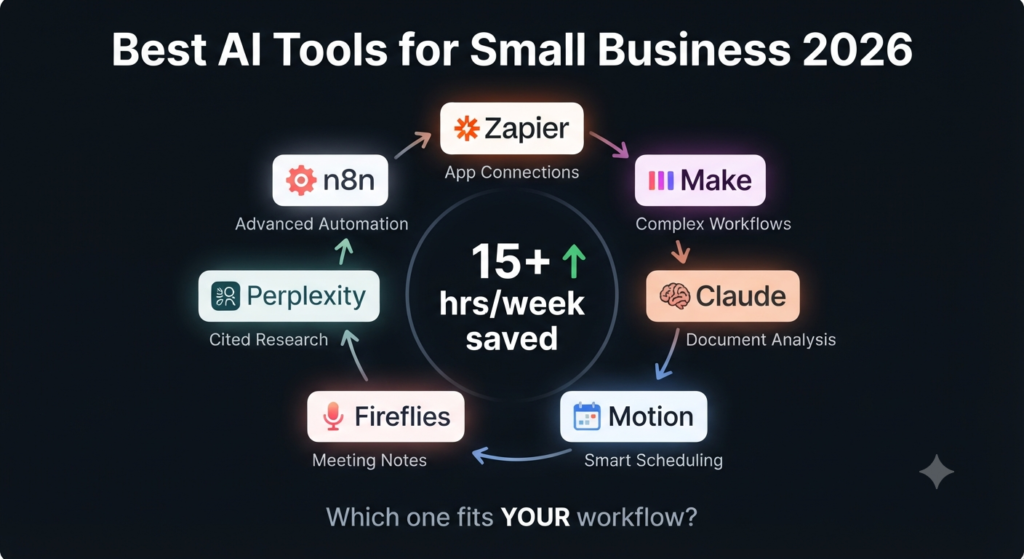

You’re still copying data between apps by hand. You’re still chasing follow-up emails manually. You’re still doing tasks that should have been automated six months ago — and it’s costing you hours every single week.
📋 What You’ll Learn
- 🏆 The 7 best AI automation tools small businesses are actually using in 2026
- 💰 Honest pricing breakdowns — free tiers included
- ⚡ Which tool fits which workflow (don’t buy the wrong one)
- 🚫 The most common automation mistakes lean teams make
- ✅ A decision framework to build your first AI workflow this week
That’s the problem with most “AI tools for small business” lists — they’re written by people who’ve never run a five-person operation on a tight budget with no IT team. They recommend enterprise tools with steep learning curves, or they hype up whatever product just launched. This list is different. Every tool here was evaluated on three things: how fast a non-technical owner can get value from it, how cleanly it connects to apps small businesses already use, and whether the ROI is real or just theoretical.
You don’t need all seven. You need two or three that hit your actual bottlenecks. Start there.
🔗 #1 — Zapier: The Connective Tissue of Your Entire Stack
Zapier
Best for: Connecting apps, routing leads, automating data entry
If you only add one tool to your stack this year, make it Zapier. It connects over 7,000 apps and its AI Copilot lets you build automations in plain English — no flowcharts, no code. Describe what you want and Zapier builds the workflow for you.
What’s changed in 2026 is the intelligence layer. Zapier’s AI Actions now let steps inside your workflows use language models to process, classify, and summarize information automatically. A form submission doesn’t just trigger an email anymore — it can trigger a GPT-powered response personalized to what the lead actually wrote.
💡 PRO TIP
Start with your single highest-volume manual task — the one someone copies between two apps every day. Automate that first. The ROI is immediate and it builds confidence to go further.
🧠 #2 — Make: For When Your Workflows Get Complex
Make (formerly Integromat)
Best for: Multi-step automations, visual workflow building, AI model integration
Make is what you graduate to when Zapier starts feeling limiting. Where Zapier prioritizes speed and simplicity, Make gives you a visual canvas that shows exactly what’s happening at every step. For teams that need to see the logic, that visibility is invaluable.
The real advantage in 2026 is Make’s AI-specific modules. You can drop an AI step anywhere inside a workflow — classify an email, summarize a document, extract structured data from a PDF — and route the output to whatever comes next. It supports OpenAI, Claude, Gemini, and other major models without requiring separate API setup.
⚠️ HEADS UP
Make’s per-operation pricing can get expensive fast if your automations run thousands of times per month. Map out your estimated volume before committing — their pricing calculator is worth using before you sign up.
🤖 #3 — Claude by Anthropic: The AI Brain for Deep Work
Claude
Best for: Long-form analysis, document processing, complex reasoning tasks
Most small business owners think of AI assistants as writing tools. Claude is that, but it’s considerably more useful when you treat it as an analyst. Feed it a 50-page vendor contract and ask what the liability clauses say. Drop in a full month of customer support tickets and ask it to identify the three most common complaints.
What sets Claude apart for business use isn’t just the 200,000 token context window — it’s the reasoning quality on nuanced tasks. According to Anthropic, Claude is designed for careful, accurate responses on complex tasks, which matters when you’re making actual business decisions based on its output.
Key finding: Claude and ChatGPT are now the top two AI assistants used by knowledge workers for deep document analysis and complex reasoning — with Claude specifically favored for tasks where accuracy and nuance matter more than speed. (ToolDiscovery AI Productivity Guide, 2026)
📅 #4 — Motion: The AI Scheduler That Respects Your Time
Motion
Best for: Calendar management, task prioritization, focus time protection
Calendar Tetris is real. You block time to work on something important, a meeting gets moved, and suddenly your whole day is a series of 20-minute gaps between calls. Motion eliminates this by treating your schedule as a dynamic system rather than a static grid.
When a meeting shifts, Motion automatically reschedules your tasks around it — prioritizing by deadline and importance, not just by what was scheduled first. Tell it you need two hours of uninterrupted work each morning, and it’ll protect that window even as your calendar fills up around it.
💡 KEY INSIGHT
Motion works best when you commit to it as your primary calendar system. The first week feels like friction. By week two, you’ll notice you’re starting deep work earlier and losing fewer hours to task-switching.
🎙️ #5 — Fireflies.ai: Never Write Meeting Notes Again
Fireflies.ai
Best for: Meeting transcription, action item extraction, CRM updates
Every small business has the same meeting problem: someone takes notes, those notes sit in a doc nobody reads, and by the following week half the action items are forgotten. Fireflies solves this by automatically joining your Zoom, Google Meet, or Teams calls, transcribing everything, and generating a structured summary with action items, decisions, and key topics flagged.
The 2026 version integrates with HubSpot and Salesforce, pushing meeting summaries directly into contact records without anyone manually entering data. For sales teams, that’s a genuinely significant time save. According to Fireflies.ai, their Speaker Coach gives personalized feedback on talk time and engagement patterns across calls over time.
“The businesses seeing the best ROI from AI automation aren’t using the flashiest tools — they’re automating the boring parts first.”
🔍 #6 — Perplexity: Research That Cites Its Sources
Perplexity AI
Best for: Business research, competitor analysis, fact-checking
The problem with using ChatGPT or Claude for research isn’t the quality — it’s the citations. When you need to verify a market stat for a client proposal, you need sources. Perplexity is built around that. Every answer links directly to the pages it pulled from, which means you can verify and dig deeper in seconds instead of opening 12 tabs.
For small business owners, the best use cases are competitor pricing research, industry trend summaries, and pre-meeting research on prospects. Tasks that used to take 45 minutes of browser tabs take under five with Perplexity. Their Pro plan adds access to GPT-4o, Claude, and real-time web data from specialized sources.
⚠️ WARNING
Perplexity is excellent for surface-level research but still makes errors on highly specific or niche topics. Always verify figures that go into client-facing materials against the primary source it cites.
🏗️ #7 — n8n: The Open-Source Powerhouse for Technical Teams
n8n
Best for: Complex agentic AI workflows, self-hosted automation, custom integrations
n8n isn’t for every small business. If you have zero technical team members, start with Zapier and come back to this one later. But if you have someone comfortable with APIs — even just casually — n8n gives you a ceiling that Zapier and Make can’t match.
What makes n8n different in 2026 is its agentic AI workflow support. You can build multi-step AI workflows where the model actually makes decisions about what to do next, not just process inputs in a fixed sequence. Self-hosting means your data never leaves your infrastructure — a meaningful advantage for businesses handling sensitive client information.
📊 All 7 Tools Side-by-Side
| Tool | Best Use Case | Starting Price | Skill Level | Free Tier |
|---|---|---|---|---|
| Zapier EASIEST | App connections, lead routing | $19.99/mo | None | ✓ 100 tasks |
| Make | Complex multi-step workflows | $10.59/mo | Low | ✓ 1,000 ops |
| Claude | Document analysis, research | $20/mo | None | ✓ Limited |
| Motion | Calendar & task management | $19/mo | None | 7-day trial |
| Fireflies | Meeting transcription + CRM sync | $18/user/mo | None | ✓ 800 mins |
| Perplexity | Cited business research | $20/mo | None | ✓ Generous |
| n8n | Agentic AI workflows | Free (self-hosted) | Medium–High | ✓ Self-hosted |
🗺️ Which One Is Right for You?
Here’s a direct answer based on your biggest workflow pain point — no ambiguity.
You’re drowning in manual data entry between apps
Start with Zapier. Set up one Zap for your highest-volume repeated task — lead form to CRM, order to fulfillment, contact to email list. You’ll see value within 48 hours.
Your meetings generate zero follow-through
Add Fireflies. Connect it to your calendar, let it run on your next three calls, and watch how differently your team treats action items when they’re automatically extracted and logged.
You spend hours on research and document review
Claude for document-heavy analysis, Perplexity for anything requiring cited sources. Use both — they’re complementary, not competing.
Your calendar controls you instead of the other way around
Motion. Commit to it for two full weeks before judging it — the value compounds once it has enough data about your priorities and patterns.
You have a technical team member and complex workflow needs
Evaluate Make first — it covers 90% of complex use cases. Graduate to n8n if you need self-hosting or agentic AI capabilities.
🚫 Automation Mistakes That Waste Money
The tools above work. But plenty of small businesses adopt them and see nothing. Usually it’s one of these reasons.
- Automating a broken process instead of fixing it first — automation amplifies both efficiency and dysfunction
- Building workflows nobody on the team understands except the person who set them up
- Picking tools based on YouTube demos instead of actual workflow fit
- Trying to automate everything at once instead of starting with one high-impact bottleneck
- Ignoring free tiers — most of these tools give you enough to validate ROI before paying
- Treating AI output as final without a human review step for anything client-facing
Research from McKinsey’s 2025 State of AI survey found that 88% of organizations regularly use AI in at least one business function — up from 78% the prior year. The gap between businesses using AI strategically and those using it experimentally is widening fast.
❓ Frequently Asked Questions
What’s the best free AI automation tool for a small business just starting out?
Zapier’s free tier (100 tasks/month) is the best entry point. It covers basic app connections without cost, and the learning curve is low enough that a non-technical owner can set up a useful workflow in an afternoon. Make’s free tier (1,000 operations/month) is a strong alternative if you need slightly more complex logic.
How much should a small business budget for AI tools in 2026?
The SBE Council’s 2026 survey shows the typical small business uses a median of five AI tools. A practical starter stack — Zapier Starter + Claude Pro + Fireflies Pro — runs around $58/month. That’s less than one hour of skilled labor at $60/hour, and it routinely recovers 10–15 hours monthly.
Can AI automation tools integrate with the software I already use?
Almost certainly yes. Zapier connects over 7,000 apps, Make supports 1,500+, and n8n covers the long tail. The more likely issue is that your existing software is poorly configured or uses inconsistent data — audit that before building automations on top of it.
Is it safe to feed sensitive business data into AI tools like Claude or ChatGPT?
It depends on the tool and your plan. Anthropic states that data submitted through the Claude API is not used to train models by default, and enterprise plans include additional privacy protections. For highly sensitive data, review each vendor’s data processing agreement before use, and consider self-hosted options like n8n with local AI models.
How long does it take to see ROI from AI automation tools?
For simple automations (Zapier connecting two apps), ROI is typically visible within the first week — often the first day. More complex workflow builds take longer to set up but deliver larger returns. McKinsey research found that businesses automating client-facing and administrative workflows see 20–35% operational overhead reduction within six months.
🏁 Where to Start This Week
Pick one tool. Not five — one. Audit your workflow for the task your team repeats most often that follows a predictable pattern. That’s your first automation target.
If that task involves moving data between two apps, start with Zapier. If it involves meetings and follow-through, start with Fireflies. If it involves research or document review, start with Claude or Perplexity. Get that first win, build the habit of reaching for automation, then expand.
The SBE Council’s data says 93% of small businesses already using AI plan to increase their spend in 2026. That’s not hype — that’s businesses that tried it and saw the numbers. The question isn’t whether AI automation is worth it. It’s which part of your operation you fix first.
💡 YOUR ACTION ITEM
Before closing this tab: write down the one task you or someone on your team does manually every day that takes more than 15 minutes. That’s your first automation. Use the comparison table above to pick the right tool and set up a free account today.